


Disclosure: Some links in this Drama Studio AI review are affiliate links. If you buy through them, I may earn a commission at no extra cost to you. I made a real drama episode inside the app before writing this, and I’ll tell you honestly where it falls short. No income claims: the micro-drama market numbers on the sales page describe the market, not your results.
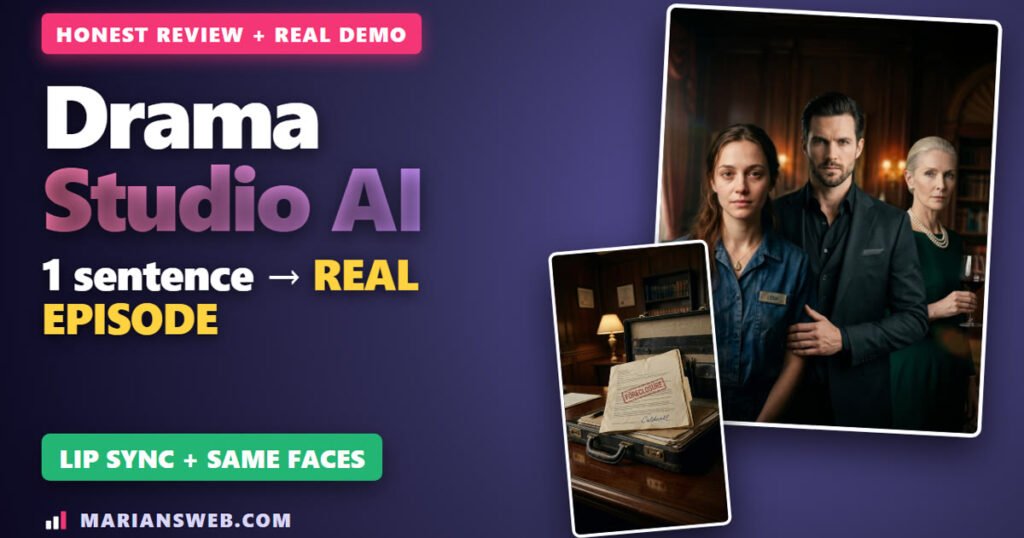
I typed one sentence into Drama Studio AI, and about an hour later I had a finished 56-second vertical drama episode: the same actors in every shot, real lip sync, voices, music, captions and a “to be continued” card at the end.
In this Drama Studio AI review I’ll show you exactly how I made it, step by step, with real screenshots from my account. You’ll also see what it really costs, the daily limits nobody talks about, the pros and cons, and who I think it’s for.
Drama Studio AI Review: Quick Summary
- What it is: a web app that turns a story idea into a vertical micro-drama series (story, cast, script, storyboard, pictures, voices, lip-sync video, captions, social posts), plus your own paywall to sell episodes
- Vendor: Firelaunchers and Eric Holmlund, launched on JVZoo on November 19, 2026 (launch ends November 25)
- Price: $37 one-time during launch (coupon DRAMA = $7 off). Bundle $497 (coupon DRAMA100 = $100 off). The vendor says it moves to a monthly subscription after launch
- My test: concept in ~20 seconds, 11 pictures in ~4 minutes, 9 voice lines in ~30 seconds, 11 video shots in ~20 minutes, free 720×1280 MP4 export
- Biggest limit: the front end gives you 5 lip-sync shots a day. My one episode needed 7
- My bonus: buy through my link and get my exclusive $0 Funnel guide plus 38 bonuses from my Mega Bonus Vault (see the bonuses)
- My verdict: an impressive all-in-one drama studio with faces that stay consistent and a paywall built in. Great for creators who want to test micro-dramas. The marketing is still on you
Watch My Drama Studio AI Video Review
The video shows the finished episode first, then every step I took to make it.
What Is Drama Studio AI?
Drama Studio AI is a browser-based studio for micro-dramas: short vertical episodes with a cliffhanger at the end, the format people binge on TikTok, ReelShort and DramaBox. You type an idea (or pick a template), and the app walks you through 10 steps: Idea, Story, Characters, Script, Scenes, Visuals, Voice, Video, Episodes and Social Content.
What makes it different from most AI video tools is the last part: a built-in paywall. You can connect your own Stripe or PayPal, keep episode one free, and charge viewers to unlock the rest on your own channel page.
Note: my review account has the front end plus the Pro Elite upgrade, so a few limits in my screenshots are higher than on the basic plan. I point those out below.
How I Made a Real Drama Episode (Step by Step)
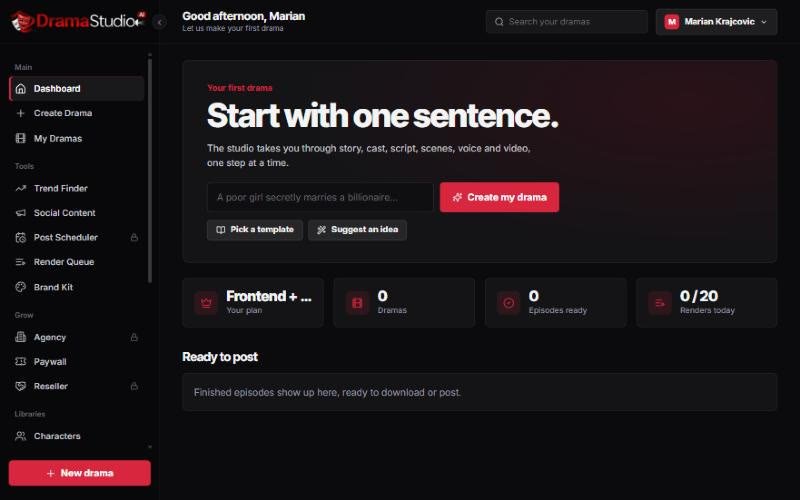
1. Idea: 105 templates + the Enhance button
You can start from your own idea (1 to 1,000 characters), a trending idea, “Surprise me”, or one of 105 ready-made templates in 22 genres. I picked Billionaire’s Secret Bride: “A waitress marries a quiet stranger to save her family home, then learns he owns the bank that is taking it.” One click on Enhance turned that sentence into a full story paragraph.
Then you pick one of 8 looks (Cinematic Realism, K-Drama Glow, Dark Thriller, Anime Drama, Storybook 3D, Vintage Film, Comic Noir, Golden Hour Romance), vertical 9:16 or horizontal 16:9, the number of episodes and their length. I chose 5 episodes of 30-60 seconds in English.
2. Story: a concept in 20 seconds and scored hooks
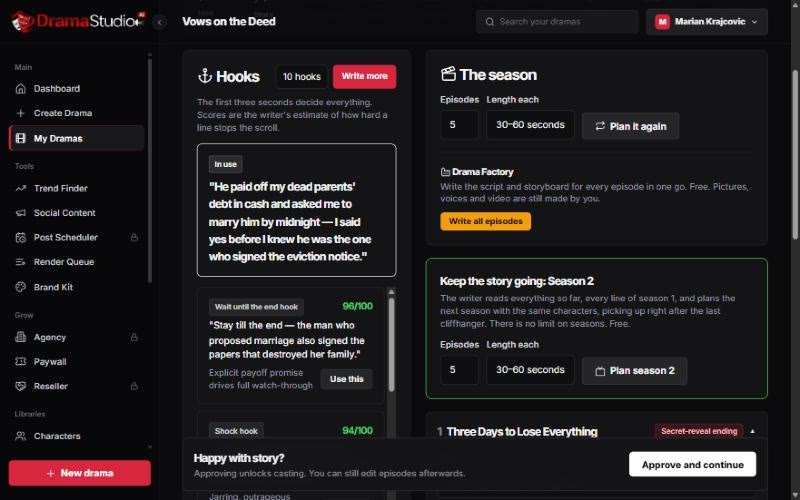
About 20 seconds later I had a title, Vows on the Deed, a logline, a season plan, four suggested characters and a viral hook: “He paid off my dead parents’ debt in cash and asked me to marry him by midnight – I said yes before I knew he was the one who signed the eviction notice.”
In the Story step you can generate 10, 20, 30 or 50 more hooks. Each one gets a score for scroll-stopping power and a short reason. My best scored 96/100. You also get five episode titles, each with its own cliffhanger type, a free “Drama Factory” that writes every script and storyboard in one go, and a button to plan season 2.
3. Characters: realistic portraits + Character DNA Lock
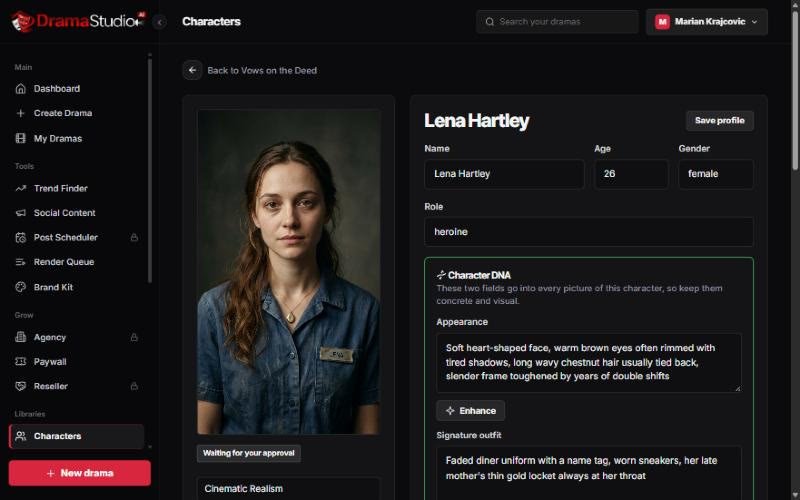
“Paint All Portraits” queued all four characters. Each one got a portrait and a full-body sheet (front, side and back), about 40 seconds per character. Then you lock the look: the appearance and outfit fields (the “Character DNA”) go into every picture of that character. To test it, I made three expressions of the heroine, Lena: angry, crying and shocked. The expressions are a bit subtle, but the face stayed the same every time.
4-5. Script and storyboard
Episode 1 got 3 scenes and 9 short lines with acting notes (cold, trembling, furious, whispering…), and you can edit any line. The storyboard turned it into 11 shots, about 46 seconds, each with a camera style (wide, close-up, cinematic, dramatic zoom) and a length. Tip: save your main location (I saved the bank lobby) so the set doesn’t drift between shots.
6. Visuals: 11 pictures in about 4 minutes
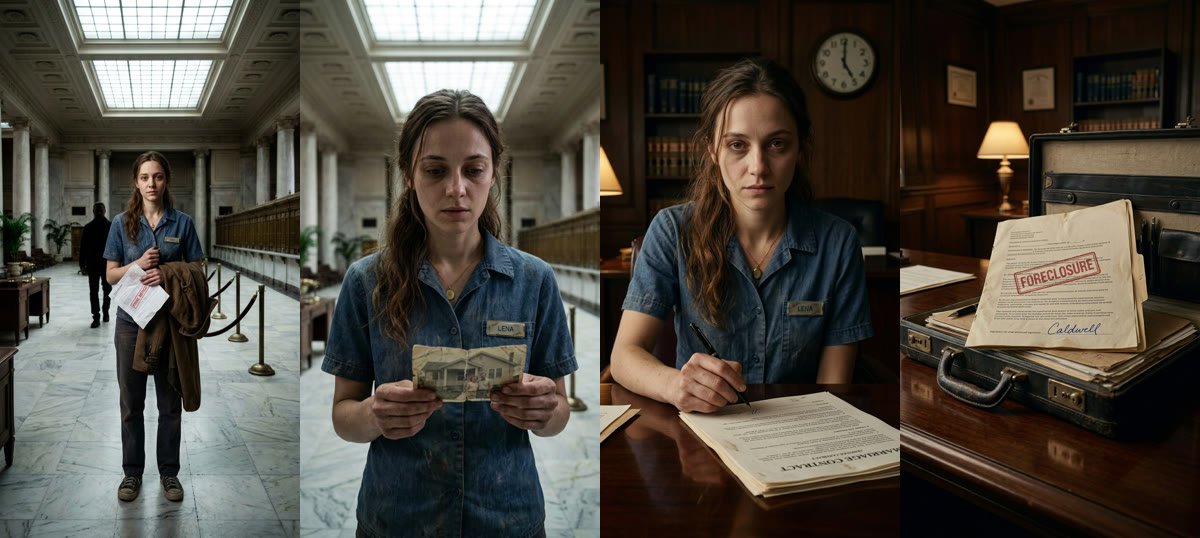
This was the moment that impressed me most. All 11 pictures had the same Lena, the same Caldwell and the same marble lobby. The app even put “LENA” on her name tag and a readable “FORECLOSURE” stamp on the folder in his briefcase. One small flaw: the text on the marriage contract was upside down.
7-8. Voices and lip-sync video
All 9 voice lines were recorded in about 30 seconds. The app picked a warm female voice for Lena, a brooding male voice for Caldwell and a narrator, and you can choose from about 30 voices or re-record any line.
Filming is the slow part: 7 lip-sync shots and 4 “natural motion” shots took about 20 minutes, two at a time. The lip sync works: the mouth follows the line. The individual clips came out at 464×832 (480p) on the standard quality setting.
The limit that matters: the front end gives you 5 lip-sync shots a day and 1 job at a time. My one episode needed 7 lip-sync shots. On the basic plan, either spread an episode over two days, or switch the non-speaking shots to “animated stills”, which are free.
9-10. Export and social content
The episode editor burns in captions (6 styles plus your own), adds music (9 built-in tracks, AI music or your own uploads) and a “to be continued” card. The MP4 export is free; mine was 56 seconds at 720×1280. The last step wrote captions, hooks and hashtags for Instagram, TikTok, YouTube Shorts and Facebook, plus a series poster with the cast. One small miss: a YouTube tag said “romance series 2024”, so read everything before you post.
The Paywall: Sell Your Episodes
Under Paywall you connect your own Stripe or PayPal (“we never hold your money”), create a show from a drama (or upload your own videos), set how many episodes are free and the unlock price, and share one channel link in your bio. You can even use your own domain, like watch.yourbrand.com, with free SSL. The front end includes 1 paid show; Pro Unlimited makes it unlimited and adds subscriptions.
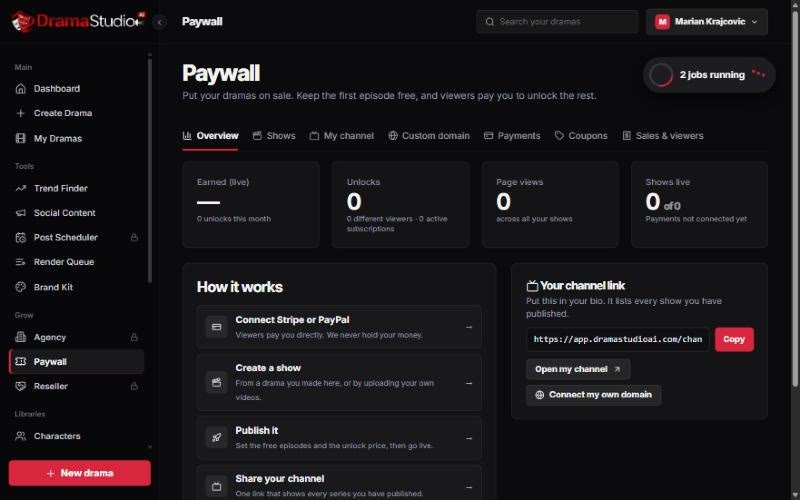
Reality check: the sales page quotes big micro-drama market numbers. That’s the market, not a promise. Nobody pays to unlock a story they never found. You still need to post consistently, build an audience and tell a story people care about.
Drama Studio AI Price, Coupons and Upgrades
| Option | Price | What you get |
|---|---|---|
| Front end | $37 one-time (coupon DRAMA = $7 off) | Up to 5 episodes per drama (~30-60 s), English, 5 lip-sync shots/day, 1 job at a time, 1 paid show, studio watermark, 30-day money-back policy |
| Pro Elite (OTO) | $67 | 10 episodes, 11 languages, your own brand kit, 20 lip-sync shots/day, 2 jobs at once |
| Pro Unlimited (OTO) | $147 | Unlimited dramas, longer seasons, post scheduler, unlimited paid shows + subscriptions |
| Agency (OTO) | $197 | Client accounts |
| Bundle | $497 (coupon DRAMA100 = $100 off) | Everything in one payment |
My Drama Studio AI Bonuses (38 + 1 Exclusive)
If you buy Drama Studio AI through my link, you also get my bonus stack, delivered right after your purchase:
- Exclusive: The $0 Funnel – my own step-by-step PDF guide to building your first email list and funnel without spending a dime, using free LeadsLeap tools. You won’t get it anywhere else
- My Mega Bonus Vault (38 bonuses) – traffic, list-building and affiliate trainings, members areas and PLR packs, such as List Prodigy, The Affiliate Whisperer, ClickWave (TikTok growth), Pixel Profits and Profit Academy PLR
- How to claim: after you buy through my link, open the bonus link on your JVZoo purchase page, enter your email, and you’re taken straight to the vault
Drama Studio AI Review: Pros and Cons
The good
- One sentence to a finished episode in about an hour
- Faces stay the same from shot to shot
- Real lip sync
- The whole process in one place, including social posts and a poster
- Your own paywall with Stripe or PayPal, no cut taken
- One-time price during launch
The not so good
- Launch-day outages (the app timed out twice during my test, nothing was lost)
- Front end: only 5 lip-sync shots a day
- 480p clips on standard quality (720p final export)
- Every step needs an approve click
- Studio watermark on the basic plan
- You still have to market your show
Who Is Drama Studio AI For?
Good fit: creators who want to test the micro-drama format on TikTok, Reels and Shorts, writers who want to turn a story into a series, and marketers who want an eye-catching new kind of content.
Skip it if you’re looking for a one-click money machine, or you need 1080p movie quality.
My tip if you get it
- Make episode 1 really good and keep it free.
- Post it with the hook the app wrote.
- Check which episode people actually watch to the end.
- Only then lock the later episodes behind the paywall.
And if you upload realistic AI people to YouTube, tick the “altered or synthetic content” box when you upload.
Drama Studio AI Review: FAQ
How long does one episode take?
About an hour of wall time for my first 56-second episode, including two short launch-day outages. Most of it is waiting for the 11 video shots (about 20 minutes).
Is there a coupon for Drama Studio AI?
Yes, during the launch: DRAMA takes $7 off the front end and DRAMA100 takes $100 off the bundle.
Do I need upgrades?
No. The front end makes complete episodes. Pro Elite is the most useful upgrade if you want more lip-sync shots per day, longer seasons, other languages or your own brand instead of the studio watermark.
Is there a refund?
The vendor offers a 30-day money-back policy through their support desk.
Related: another AI video tool I tested hands-on: my FusionVision review.
Final Verdict
Drama Studio AI is the most complete micro-drama tool I’ve tested: one sentence in, a finished episode out, and a paywall to sell it. The characters really do stay consistent, and the lip sync works. Just go in with clear eyes: the front end’s 5 lip-sync shots a day will slow you down, and the app can’t find your audience for you.
Earnings disclaimer: I can’t promise you’ll make money with Drama Studio AI or any tool. Results depend on your stories, your audience and your effort. Prices and features were checked on November 19, 2026 and may change after the launch.