


Disclosure: Some links in this TubeHarvest review are affiliate links. If you buy through them, I may earn a commission at no extra cost to you. I made a real video package inside the app before writing this, and I’ll tell you honestly where it falls short. No income claims: views and subscribers depend on your niche, your content and your effort.
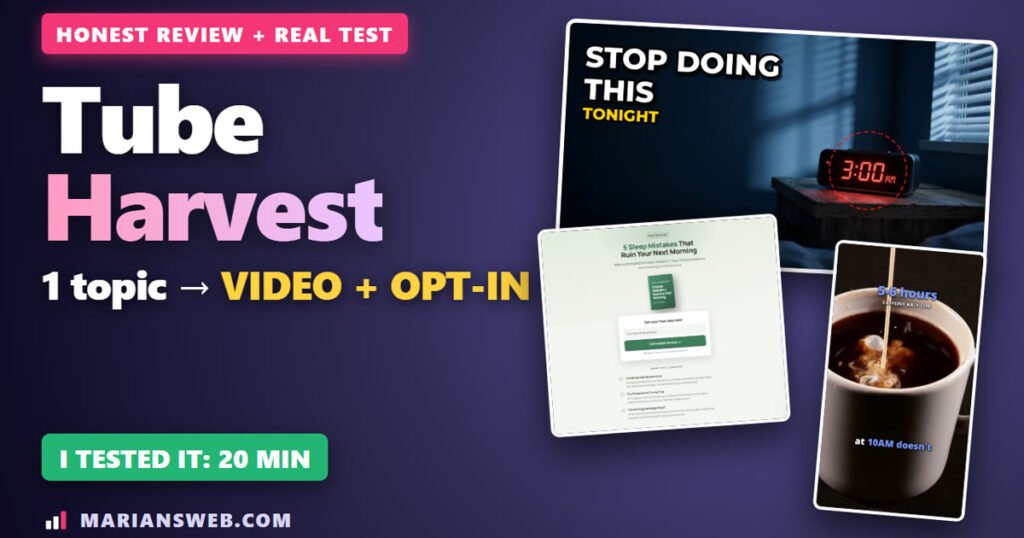
I typed one topic into TubeHarvest, and about 20 minutes later I had a finished 2:51 faceless YouTube video in full HD, three Shorts, a thumbnail, the SEO title, description and tags, and a live landing page with a free PDF guide to collect email addresses.
In this TubeHarvest review I’ll show you exactly what it made, with real screenshots and the real output, the flaws I found (one of them matters if you want to build a list), what it costs, the upgrades, and who should skip it.
TubeHarvest Review: Quick Summary
- What it is: a cloud app that turns one topic into a faceless YouTube package (long video, 3 Shorts, thumbnail, SEO texts) plus a matching opt-in page and free PDF guide, so viewers can join your email list
- Vendor: Max Gerstenmeyer and Wayne Crowe, on JVZoo. Launch November 17 to November 23, 2026 (11:59 PM ET)
- Price: TubeHarvest Commercial is $47 one-time during the launch (10 packages a month, commercial license, 14-day money-back). The sales page says it goes to $97/month after November 23. Bundle $297, coupon Harvest50 = $50 off
- My test: about 20 minutes from click to finished package; 2:51 video at 1920×1080 with matching stock footage and word-by-word captions; Shorts of 36, 44 and 28 seconds
- Biggest flaw: the free PDF guide is about one page of plain text, and its landing page promises topics that aren’t in it
- My bonus: buy through my link and get my exclusive $0 Funnel guide plus 38 bonuses from my Mega Bonus Vault (see the bonuses)
- My verdict: fast, complete faceless video packages with a list-building page built in. Worth it for affiliates and beginners who will check and polish each video before posting
Watch My TubeHarvest Video Review
The video plays the first 36 seconds of the video TubeHarvest made for me, unedited, then walks through every part of the package.
What Is TubeHarvest?
TubeHarvest is a new browser-based app from Max Gerstenmeyer and Wayne Crowe. The idea behind it is what they call the Harvest Loop: a topic becomes a video and Shorts, YouTube brings the viewers, and a matching free guide turns those viewers into email subscribers you own.
Most faceless video tools stop at the MP4 file. TubeHarvest keeps going and builds the opt-in page and the lead magnet too. That’s the part that makes it interesting for affiliate marketers: the views fade, but the list stays.
How I Made a Video Package (Step by Step)
1. Type a topic (or paste your own script)
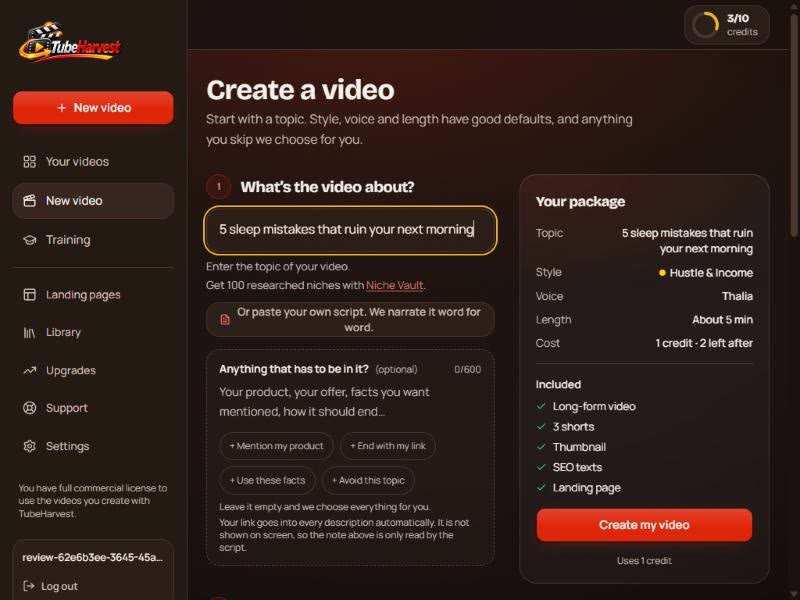
The dashboard has one box: What’s your next video about? I typed “5 sleep mistakes that ruin your next morning”. Below it there’s an optional box (600 characters) for anything that has to be in the video: your product, your link, facts to use or a topic to avoid. You can also paste your own script, and the app narrates it word for word.
2. Pick a niche style, a voice and a length
There are 10 niche styles (Hustle & Income, Personal Finance, Dating & Social, AI & Tech, Health & Fitness, Sleep & Recovery, Productivity, Money & Budget, Pet Care, Career) plus a custom option. The style sets the look and the music. You get 9 AI voices and a length of about 3, 4 or 5 minutes on the front end. I picked Sleep & Recovery, the voice Orion and about 3 minutes. One package costs one credit.
3. Wait about 20 minutes
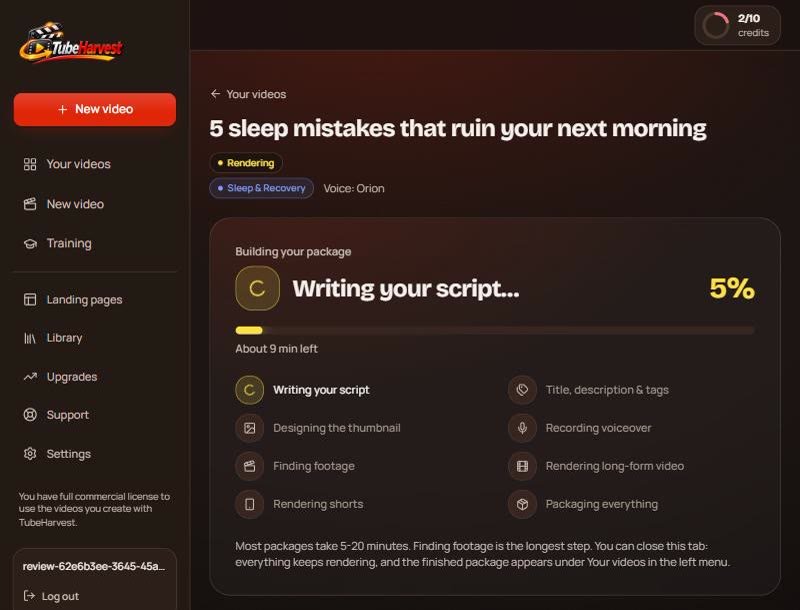
TubeHarvest writes the script, the title and tags, designs the thumbnail, records the voice, finds stock footage and renders the long video and the Shorts. You can close the tab while it works. My package took about 20 minutes, and “finding footage” was the longest step.
4. The finished package
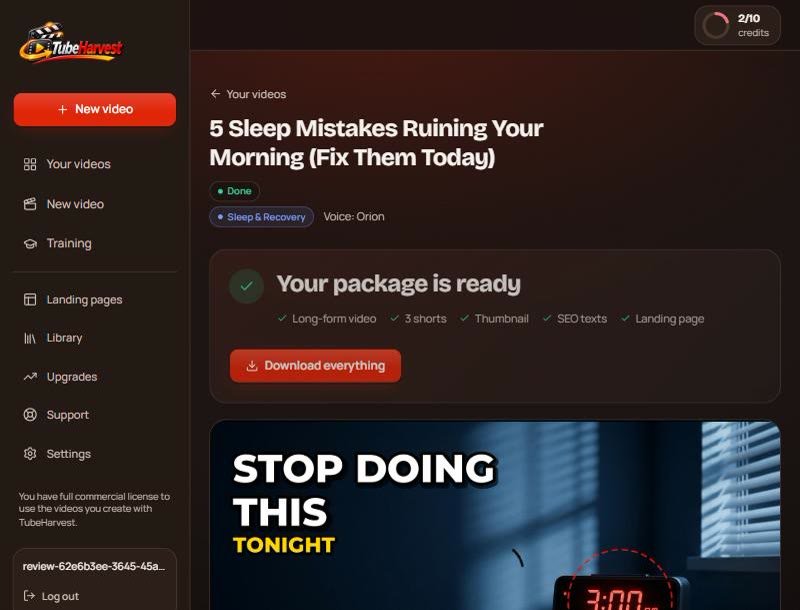
Everything lands on one page with a Download everything button: long-form video, 3 Shorts, thumbnail, SEO texts and the landing page. It also rewrote my topic into a more clickable title: “5 Sleep Mistakes Ruining Your Morning (Fix Them Today)”.
What TubeHarvest Actually Made (Honest Look)
The long video: 2:51, 1080p, real stock footage
The video came out at 1920×1080. It uses real stock clips from Pexels and Pixabay (credited in the description) and word-by-word captions. The clips match what’s being said: coffee when it talks about caffeine, a heavy dinner, a late workout on a treadmill. It’s a clean faceless video, not a slideshow of random images.

SEO texts (and one small slip)
You get a YouTube title, a long description with chapters, 12 tags and captions for TikTok, Instagram and X, each with a copy button. One small flaw: the video covers five mistakes, but one chapter was called “The Three Hidden Mistakes”. The description also had a slightly dramatic line about the sleep-aid industry. Read everything before you paste it, especially on health or money topics.
The AI thumbnail
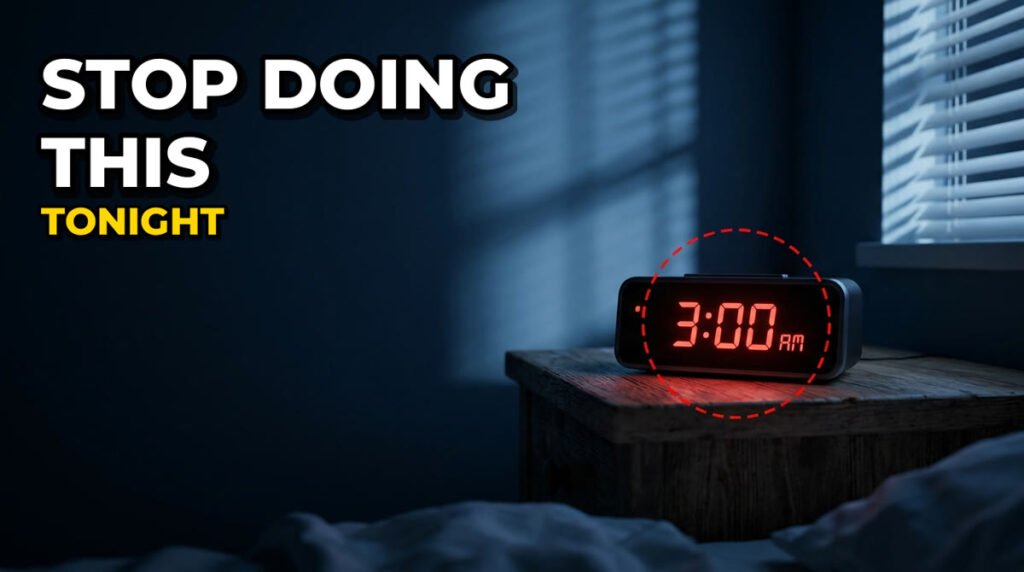
Big text, “Stop doing this tonight”, and an alarm clock showing 3:00 AM. Honestly, I’d click it. Bold, simple and on topic.
Three Shorts
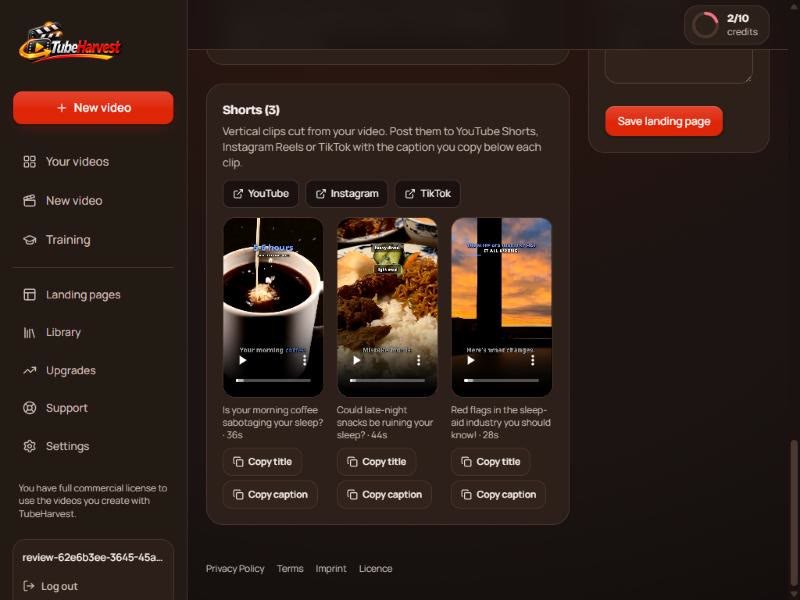
Three vertical clips (1080×1920) cut from the long video: 36, 44 and 28 seconds, each with its own title and caption, ready for YouTube Shorts, Reels or TikTok.
The landing page
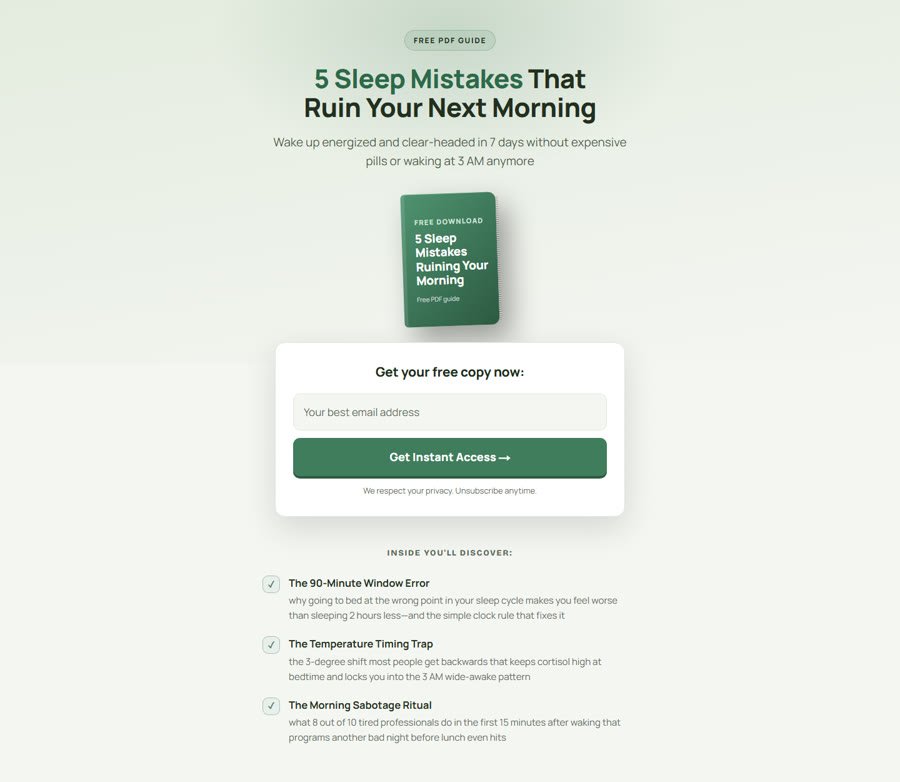
This is the part most AI video tools don’t have. The landing page went live by itself, and its link was already in the video description. Clean design, an email box and three bullet points about the free guide. Leads are saved inside TubeHarvest (CSV export), or you paste a form code from ActiveCampaign, AWeber or a similar autoresponder and the leads go straight to your own list.
The free guide: the weakest part
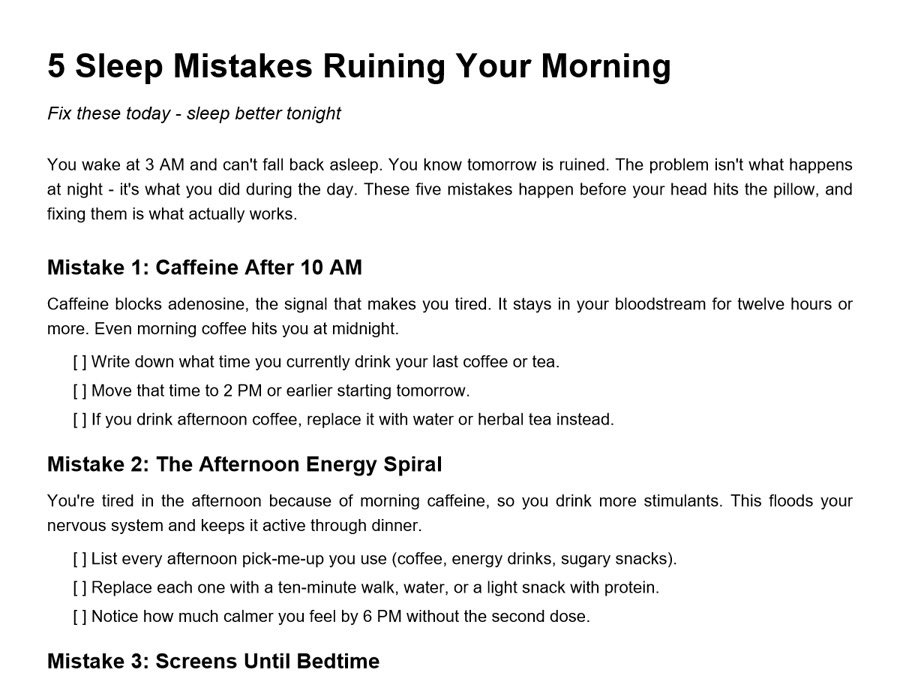
I downloaded the lead magnet. It’s a real checklist: the same five mistakes as the video, each with three small action steps. But it’s only about one page of plain text with no design, and the bullets on the landing page promise different things (a “90-minute window error” and a “temperature timing trap”) that aren’t in the guide. If you send real people to that page, fix the guide or the bullets first, or your first email will start with a broken promise.
Other Features: Topic Library, Links, Training
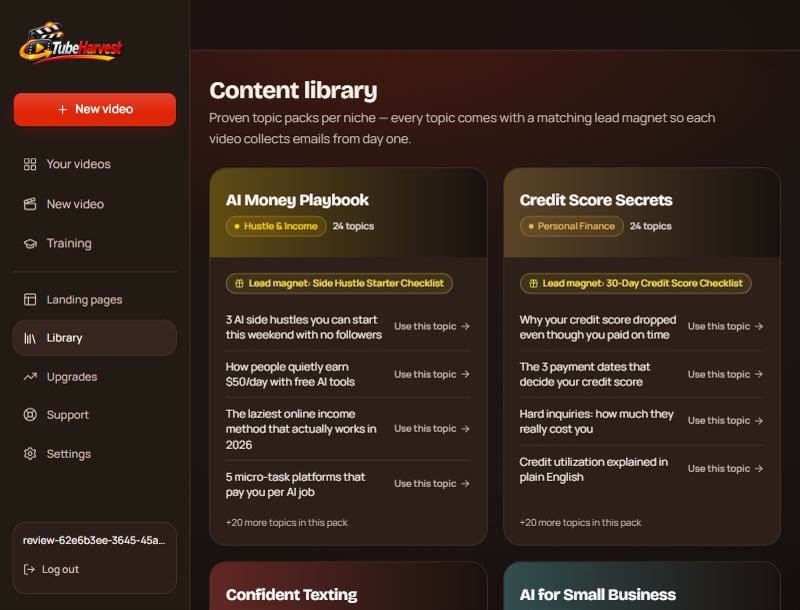
- Content library: 10 topic packs with 24 topics each, every pack with a matching lead magnet idea (for example a credit score checklist or a deep sleep protocol)
- Your links: save up to 8 links in Settings and they’re added to the description of every new video. That’s where your affiliate link goes
- Training: 8 short lessons, from your first video to Shorts and using your own voice or script
- Support: right now it’s an email address to Max, with no help desk
A YouTube Reality Check
The TubeHarvest sales page itself mentions that in January 2026 YouTube terminated channels with millions of subscribers for mass-produced, low-effort uploads. So don’t use any AI video tool to upload ten unedited videos a month and walk away. Watch each video, fix the mistakes, add your own take and check health or money claims. The tool makes the video. You’re still the publisher. (I wrote more about this in how to grow on YouTube.)
TubeHarvest Price and Upgrades
TubeHarvest Commercial: $47 one-time during the launch. You get 10 video packages a month, videos up to 5 minutes, 3 Shorts per package, a thumbnail, SEO texts and social captions, a landing page with email capture and a lead magnet PDF, a commercial license for client work, and a 14-day money-back guarantee. According to the sales page, it goes to $97/month after November 23, 2026. There’s also a Personal plan at $27/month (7 packages, up to 4 minutes, personal use only).
Upgrades (all optional):
- Order bumps: Niche Harvest Vault $9 (100 researched niches), Thumbnail & Hook Booster $14 (3 thumbnail variations, hooks, title pairs)
- Fastpass $277: every upgrade in one payment
- Premiere $47/month: 30 packages a month, videos up to 10 minutes, 5 Shorts, priority rendering (downsell: Plus $27/month)
- Harvest Growth $47: more landing page and bridge page templates, an AI-written 5-email follow-up for each lead magnet, more lead magnet formats (Lite $27)
- DFY Channel Pack $37: channel profile picture, banner, description, 30 topics and playlists (Lite $17)
- Whitelabel: $97 (25 clients), $197 (50) or $297 (300), runs on your own API keys
- Bundle $297: Commercial plus Premiere, Harvest Growth, the DFY Channel Pack and Whitelabel 50. Coupon Harvest50 takes $50 off
My take: start with the front end. If you’ll use the list-building side seriously, Harvest Growth (the follow-up emails) is the upgrade that makes the most sense.
My TubeHarvest Bonuses (38 + 1 Exclusive)
If you buy TubeHarvest through my link, you also get my bonus stack, delivered right after your purchase:
- Exclusive: The $0 Funnel – my own step-by-step PDF guide to building your first email list and funnel without spending a dime, using free LeadsLeap tools. You won’t get it anywhere else
- My Mega Bonus Vault (38 bonuses) – traffic, list-building and affiliate trainings, members areas and PLR packs, such as List Prodigy, The Affiliate Whisperer, ClickWave (TikTok growth), Pixel Profits and Profit Academy PLR
- How to claim: after you buy through my link, open the bonus link on your JVZoo purchase page, enter your email, and you’re taken straight to the vault
TubeHarvest Review: Pros and Cons
The good
- One topic to a full package in about 20 minutes
- A real 1080p video with matching stock footage and word-by-word captions
- 3 Shorts and a strong thumbnail included at no extra credit
- A live opt-in page per video, so viewers can join your list
- Your affiliate links added to every description automatically
- One-time launch price with a commercial license
The not so good
- The free guide is basic and doesn’t match its own landing page
- Small slips like a wrong chapter title
- You must check health and money claims before publishing
- A monthly cap of 10 packages on the front end
- Support is email only
Who Is TubeHarvest For?
Good fit: affiliate marketers and beginners who want a faceless YouTube channel that builds an email list, not just views, and freelancers who want to sell simple video packages to clients (the commercial license allows it).
Skip it if you want to mass-upload AI videos with no editing, or if you need long, in-depth videos on the front end (the limit is 5 minutes).
My tip if you get it
- Pick one niche and one affiliate offer
- Make your first video from the library topics
- Rewrite the free guide so it matches the landing page and adds real value
- Connect your own autoresponder so the welcome email goes out right away
- Post one video and its three Shorts every week, watched and fixed by you
TubeHarvest Review: FAQ
How long does one video package take?
My 3-minute package took about 20 minutes from click to finished. The app says most packages take 5 to 20 minutes.
Do I need an API key or other paid tools?
No. The front end includes the voice, footage and rendering. Only the whitelabel upgrades run on your own API keys.
Is there a TubeHarvest coupon?
Yes, for the bundle: coupon Harvest50 takes $50 off the $297 TubeHarvest Bundle.
Is there a refund?
Yes. The vendor offers a 14-day money-back guarantee: contact support within 14 days of purchase.
Related: other AI video tools I tested hands-on: my Drama Studio AI review and my FusionVision review.
Final Verdict
TubeHarvest does what it promises: one topic in, a faceless video, Shorts, a thumbnail, SEO texts and a live opt-in page out, in about 20 minutes. The video quality surprised me. The list-building side is the real selling point, but the free guide needs your work before it’s worth an email address. Get it if you’ll treat it as a fast first draft and add the polish yourself.
Earnings disclaimer: I can’t promise you’ll get views, subscribers or sales with TubeHarvest or any tool. Results depend on your niche, your content, your consistency and the offers you promote. TubeHarvest is not affiliated with YouTube or Google. Prices and features were checked on November 19, 2026 and may change after the launch.