


AI content tools are changing how creators write, share and earn online. Creating good content is only half the job; getting it seen across many platforms is the other half, and that’s where most creators run out of time. AI repurposing tools take one long piece of content and turn it into many short ones, so your best ideas reach people wherever they scroll.
Disclosure: this post contains affiliate links. If you buy through them I may earn a commission at no extra cost to you.
The Problem: One Piece of Content, Many Platforms
You spend hours on a YouTube video, podcast or blog post and hit publish. Then what? Unless you also post clips to Reels, TikTok and Shorts, threads to X and Threads, and updates to LinkedIn, most people never see it. Doing that by hand is practically a second job.
What AI Repurposing Tools Do
- Find the most engaging moments in long videos and cut them into vertical clips
- Add captions automatically
- Turn articles and transcripts into social posts, threads and newsletters
- Resize content for each platform
- Suggest titles, hooks and hashtags
ShortX.ai: An AI Repurposing Tool
ShortX.ai is built for this job: it takes long-form content such as YouTube videos, blog articles or podcasts and turns it into short-form content for Instagram Reels, TikTok, YouTube Shorts, X and LinkedIn.
Who it suits: creators, coaches and small businesses that already produce long content but don’t have time to repurpose it.
What to check before buying: the current pricing and usage limits, which platforms and input formats it supports, and whether you can edit the clips and captions before posting.
How to Build a Repurposing Workflow
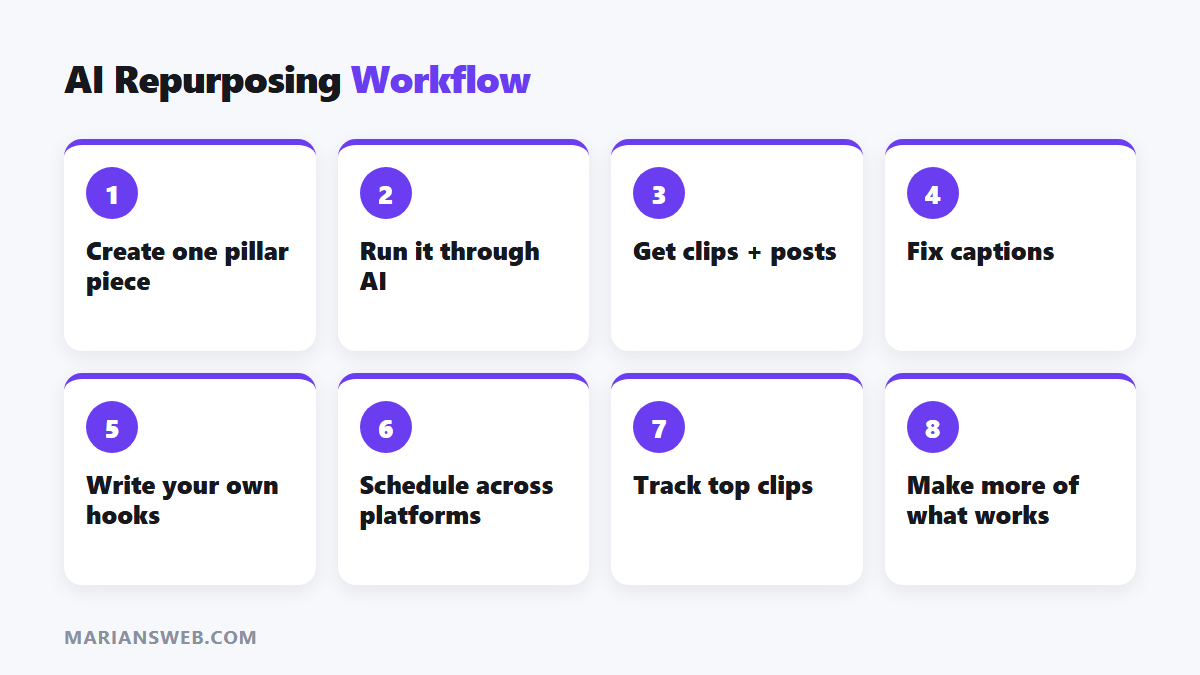
- Create one “pillar” piece a week: a video, podcast episode or in-depth article.
- Run it through your AI tool to generate clips and text posts.
- Edit the outputs: fix captions, sharpen hooks, remove weak clips.
- Schedule posts across platforms through the week.
- Track which clips perform best and make more pillar content on those topics.
One pillar piece can realistically produce 5 to 10 short clips and several text posts, enough to stay visible every day.
Other AI Content Tools Worth Knowing
- ChatGPT and Claude: scripts, outlines, threads and newsletters; see how to write AI prompts
- Pictory: turns scripts and articles into videos
- GravityWrite: templates for blog posts and marketing copy
- CapCut: free editing and auto-captions
Keep the Human Touch
- AI picks moments by patterns; you know which ones actually matter to your audience.
- Review captions; automatic transcription makes mistakes with names and jargon.
- Write your own hooks for the best clips; they make the biggest difference.
Turn Reach Into Income
More visibility is only valuable if it leads somewhere. Point your clips to a free resource that captures emails, then recommend your products or affiliate offers to subscribers. My free guide The $0 Funnel walks you through it, and short-form video for affiliate income shows how to monetize clips.
AI Content Tools: FAQ
Will repurposed content hurt my reach?
No, as long as each version is native to the platform (right format, captions, no other platform’s watermark).
Do I still need to create original content?
Yes. Repurposing multiplies good content; it can’t replace it.
Which tool should I start with?
If you already make long videos, start with a clip tool like ShortX.ai. If you write, start with ChatGPT or Claude to turn posts into threads and newsletters.