

Disclosure: Some links in this AffiliateSpark review are affiliate links. If you buy through them, I may earn a commission at no extra cost to you. I bought AffiliateSpark with my own money and tested it on a real product before writing this, and I’ll be straight with you about where it falls short.
“Paste a link, let AI make the video, collect the commission.”
That’s the headline on the AffiliateSpark sales page. If you’ve ever posted an affiliate review video that got 15 views in two weeks, it’s a tempting promise.
So I bought it, logged in, and ran it on a real product: the number one WarriorPlus seller of the last 30 days. In this AffiliateSpark review I’ll show you every step, what the tool does well, what the AI does not do, and whether it’s worth $37.
AffiliateSpark Review: Quick Summary
- Product: AffiliateSpark (web app for YouTube affiliate keyword research)
- Creator: David Mills (LearnWire YouTube channel)
- Price: $37 one-time at launch (until Sunday, November 15, 2026, 11:59 PM CST), then $57
- What you get: 100 scan credits, buyer keywords with volume, CPC, difficulty and intent, a YouTube competition check, a title generator, CSV/TXT export and a faceless video prompt builder
- Upgrades inside: Pro (Competitor Genius + Viral Genius), Calendar, Video Studio and Product Radar. Optional
- Guarantee: 14-day money-back guarantee from the vendor
- My bonus: my Mega Bonus Vault (38 bonuses + my exclusive $0 Funnel guide) when you buy through my link (see what’s inside)
- My verdict: A genuinely useful research tool for affiliates who publish review videos. It is not a video machine: the AI writes prompts, you still make the video
Watch My AffiliateSpark Video Review
Prefer to watch? Here’s my full AffiliateSpark video review: the real scan, the YouTube competition check, the video prompts and my verdict, in about 6 minutes.
What Is AffiliateSpark?
AffiliateSpark is a web app for people who make affiliate review videos on YouTube. You give it a product’s sales page, and it tells you what buyers search for, how much traffic and competition those searches have, and which ones are still open on YouTube. Then it writes titles and video prompts for you.
It’s made by David Mills, who runs the LearnWire channel and says he has earned over $700,000 in affiliate commissions with free YouTube traffic. AffiliateSpark is his manual research process turned into software.
The idea behind it is simple and, in my experience, correct: a click is not a sale. Someone typing “best laptop under 500 for students” is much closer to buying than someone typing “why is my laptop slow”. If your video answers the buyer’s search, you don’t need a big channel.
How I Tested AffiliateSpark
I didn’t want a demo product, so I picked a real one: Pin2Profit AI, the number one seller in the WarriorPlus marketplace over the last 30 days. At the time of my test it had 1,000+ sales, a 9% conversion rate and a 4% refund rate, so it’s a product people actually buy. Then I ran it through every step of AffiliateSpark.
Step 1: Scan the sales page
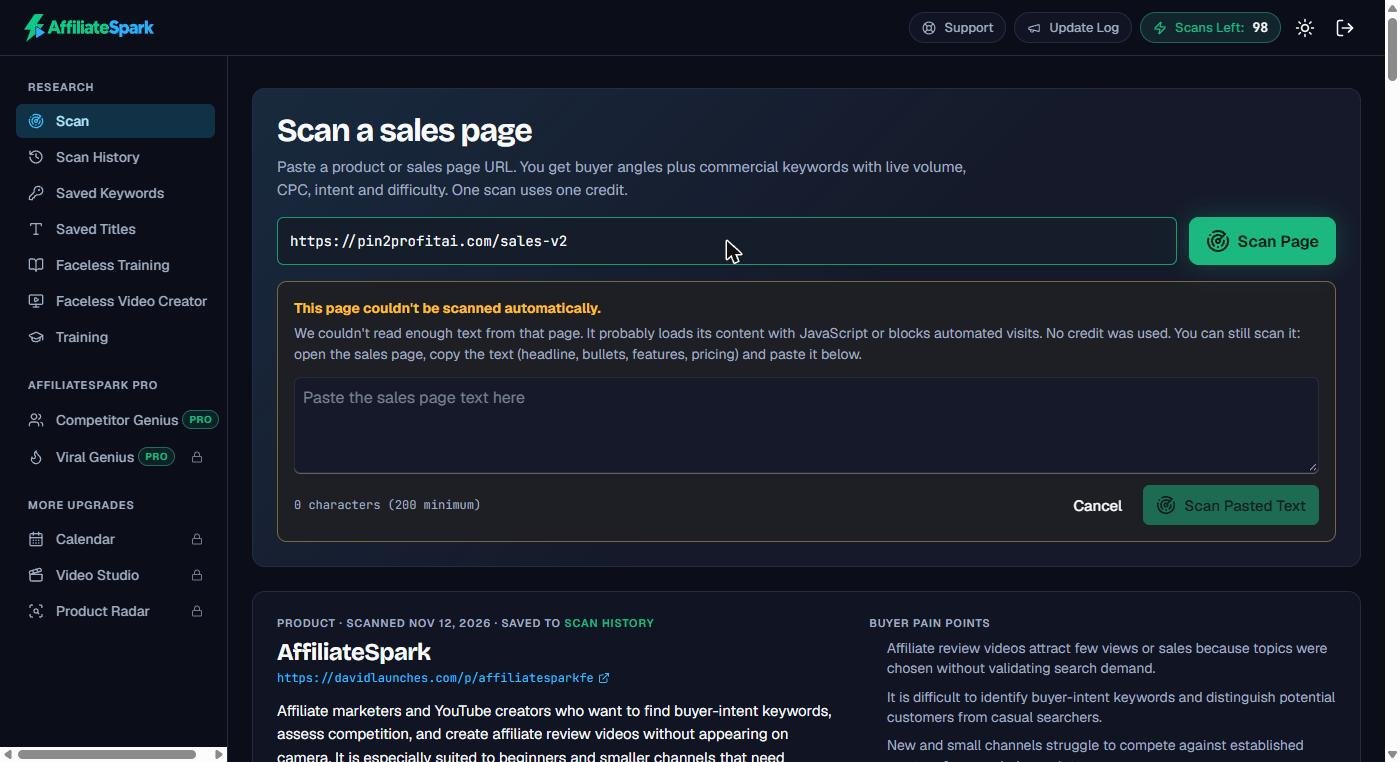
You paste the sales page link and click Scan Page. One scan uses one of your 100 credits.
First surprise: the scan failed. The app said “This page couldn’t be scanned automatically”, because the Pin2Profit page loads its text with JavaScript, and a lot of WarriorPlus pages do. The good news: no credit was used, and the app gives you a box to paste the sales page text instead. Ctrl+A, Ctrl+C on the sales page, Ctrl+V in the box, click Scan Pasted Text, and it works. The same happened when I scanned AffiliateSpark’s own sales page.
Step 2: Read the buyer profile and keywords
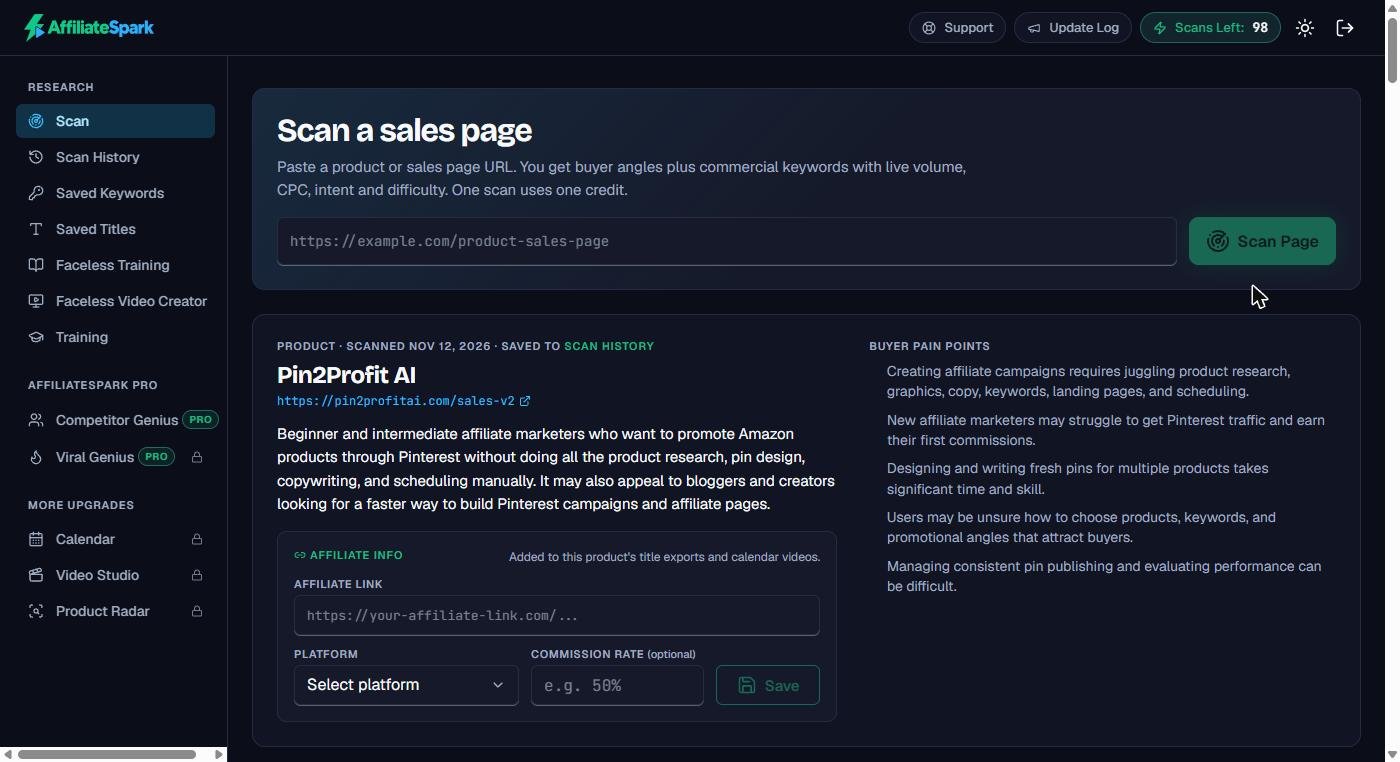
About a minute later you get the result. At the top, a short description of the target buyer and five pain points (for Pin2Profit: getting Pinterest traffic, designing pins, picking products, posting consistently). That alone tells you what your video should talk about.
Below that is the keyword table: 150 keywords with search volume, cost per click, a 0-100 difficulty score and the search intent. At the top are four “Start here” keywords: the product name plus review, tutorial, pricing and alternatives. For a new product they show no data yet, but the app rightly tells you to make those videos first, because that’s what people type right before they buy.
The useful keywords for Pin2Profit were further down: pinterest affiliate marketing (18,100 searches a month, difficulty 20) and how to make money on pinterest (14,800, difficulty 17). That’s real value. If you want an example of turning that kind of keyword into content, I wrote a guide on Amazon affiliate marketing on Pinterest.
Two things I didn’t like:
- Filler keywords. A good part of the list was broad or doubled-up phrases like “affiliate marketing affiliate marketing” and “marketing affiliate marketing”, all with identical numbers. You’ll skip those.
- 150, not 700. The sales page says each scan analyzes “up to 700 keywords”. Both of my scans returned 150 keywords, and the app itself says 150. Still plenty to work with, but it’s not what the sales page suggests.
Step 3: Check the YouTube competition (the best feature)
Save the keywords you like, then click Analyze YouTube Competition. AffiliateSpark looks at the top 20 YouTube results for each phrase and counts how many videos use your exact phrase in the title. This step doesn’t cost a credit, and you can re-check each keyword every 14 days.
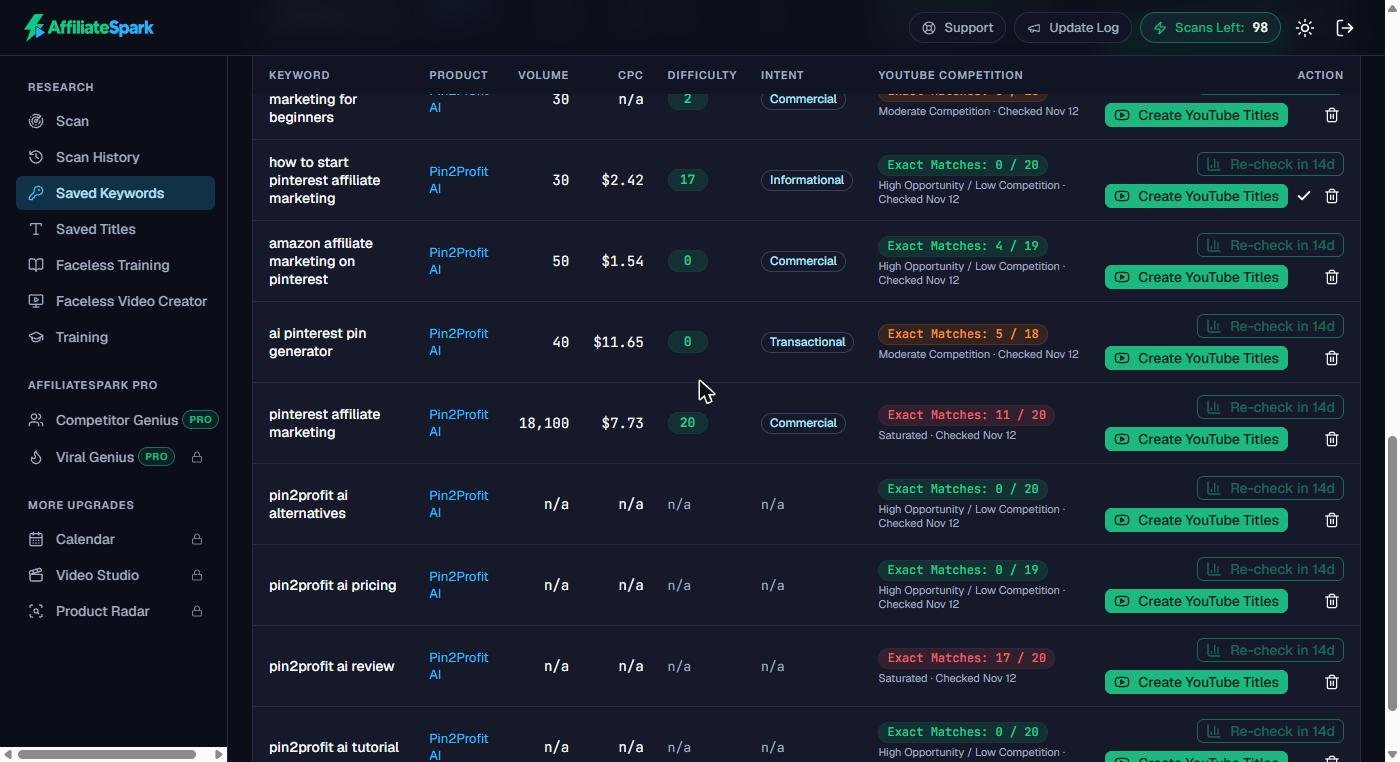
This is where it earned its money for me. Here’s what it found for Pin2Profit AI:
| Keyword | Exact matches in the YouTube top 20 | Verdict |
|---|---|---|
| pin2profit ai review | 17 / 20 | Saturated |
| pinterest affiliate marketing | 11 / 20 | Saturated |
| pin2profit ai pricing | 0 / 19 | Open |
| pin2profit ai alternatives | 0 / 20 | Open |
| how to start pinterest affiliate marketing | 0 / 20 | Open |
| amazon affiliate marketing on pinterest | 4 / 19 | Open |
Four weeks after launch, the obvious “Pin2Profit AI review” video had already been made by 17 other affiliates. But nobody had made a “pricing” or “alternatives” video yet. Without this check, I would have recorded the 18th review and wondered why it didn’t rank.
Step 4: Generate YouTube titles
Click Create YouTube Titles on a keyword and you get five titles, each starting with the exact keyword and under 70 characters, for example “How to Start Pinterest Affiliate Marketing: Beginner Tutorial”. You can save them and export them.
They’re correct for search, but formulaic (always “Keyword: Suffix”), and once it suggested “Is It Worth It in 2025?” when it was already late 2026. Treat them as a starting point and edit before you publish.
Step 5: The Faceless Video Creator (does AI make the video?)
This is the part the headline is about. The Faceless Video Creator is a 5-step wizard: pick the product, choose a hook style and intro length, set your walkthrough length and calls to action, pick an outro style, and generate.
Its very first message is telling: “Record your screen recording first” (5 to 8 minutes).
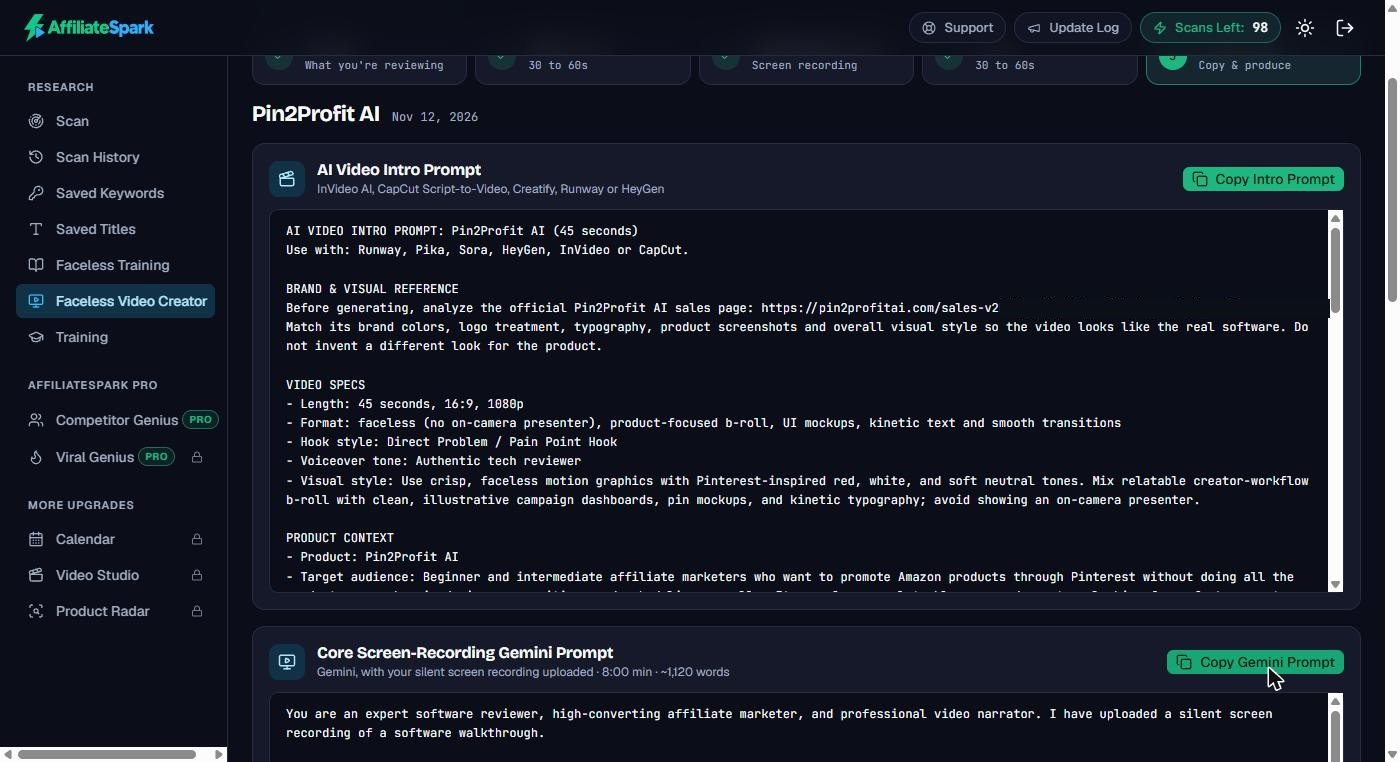
What you get at the end are three prompts:
- an AI video intro prompt to use in Runway, Pika, Sora, HeyGen, InVideo or CapCut,
- a Gemini narration prompt: you upload your own silent screen recording to Gemini and it writes a narration script (about 1,120 words for 8 minutes) synced to it,
- an AI video outro prompt.
The prompts are detailed and well thought out. But to be clear: AffiliateSpark does not make the video. You still need access to the product, a screen recorder, an AI voice (the app points you to ElevenLabs) and a video tool or editor. Some of those cost extra.
The “Faceless AI Video Masterclass”
The sales page values the bonus masterclass at $97 and calls it “a complete, step by step training blueprint”. Inside, it’s two videos: a low-cost manual method for review videos without a voiceover, and a 32-minute lesson on VideoMule, a separate paid tool that turns screen recordings into narrated tutorials. Helpful, but short. There are also short tutorial videos for every part of the app.
AffiliateSpark Upgrades (OTOs)
Inside the app you’ll see four locked areas, each with an “Upgrade required” page. They’re optional, and everything I showed above works without them:
- AffiliateSpark Pro: Competitor Genius (track up to 10 competitor channels and model their winning titles), Viral Genius (10 browse/suggested-style titles per run) and 150 extra scan credits.
- Content Engine & Calendar: turn saved titles into a publishing schedule with a 6-stage production checklist.
- Video Studio: hooks, SEO descriptions with an FTC disclosure, tags, call-to-action scripts and thumbnail prompts.
- Product Radar: trending offers from AppSumo, ClickBank and WarriorPlus with a competition rating.
The sales page also offers a bundle with all of them at once. If you’re new, start with the front end and see if you actually use it.
Does the Strategy Behind It Work?
The sales page shows the vendor’s results from the last four weeks, for example “rhims 10 review”: #1 on YouTube, 65 sales. I can’t check his sales, but I can check the ranking. I searched YouTube for “rhims 10 review” and “traffic blackbox ai review”, and his LearnWire channel was number one for both.
The interesting part: those videos had only about 650 views each. That’s the whole point of this method. A review of a brand-new launch doesn’t need thousands of views. It needs a few hundred of the right viewers: people who are already deciding whether to buy. (If you’re building a channel from scratch, my post on how to grow on YouTube covers the basics.)
The catch is speed. As my Pin2Profit test showed, the review keyword for a new launch fills up within days or weeks. You win by being early, and by making the pricing, alternatives and tutorial videos that others skip.
AffiliateSpark Pros and Cons
Pros
- Buyer keywords and pain points for any product in about a minute
- The YouTube competition check shows which videos are still worth making
- SEO titles and export in one click
- Failed scans, competition checks and titles don’t cost credits
- One-time price, 14-day guarantee
Cons
- The headline oversells it: the AI writes prompts, it doesn’t make the video
- 150 keywords per scan, not “up to 700”
- Some filler keywords in every list
- Many WarriorPlus pages need the copy-paste workaround
- The “masterclass” is two videos; four paid upgrades inside
Who Should Buy AffiliateSpark?
Buy it if you will actually publish videos, especially reviews of new WarriorPlus, JVZoo or AppSumo launches, and you want to know which keywords are still open before you spend an evening recording.
Skip it if you’re looking for a push-button tool that makes and uploads videos for you. That’s not what this is, whatever the headline says.
My AffiliateSpark Bonus: The Mega Bonus Vault
AffiliateSpark helps you find the right video to make. My bonus helps with everything around it. If you buy AffiliateSpark through my link, you get my Mega Bonus Vault: 38 bonuses including free traffic trainings, affiliate courses, AI trainings and coaches, and PLR packs, plus my own $0 Funnel guide to building an email list with free tools.
After your purchase, the WarriorPlus receipt page shows a “claim your bonus” link. See the full bonus list here.
AffiliateSpark Review: FAQ
Is AffiliateSpark a one-time payment?
Yes. The front end is $37 one-time during the launch (then $57), with 100 lifetime scan credits. The vendor says you can buy more credits later if you run out.
Does AffiliateSpark make videos for you?
No. It writes prompts for an AI intro, a narration script (via Gemini, using your own screen recording) and an outro. You make the video with other tools.
Can I scan any sales page?
Plain pages scan directly. Pages that load their text with JavaScript fail, without using a credit, and you paste the text in instead. Both WarriorPlus pages I tried needed the paste method.
Do I need a big YouTube channel?
No, and that’s the strength of the method. Searches with few competing videos can be won by small channels. You still need to publish consistently and be early on new launches.
Final Verdict
AffiliateSpark is a good research tool wrapped in an overhyped headline. The keyword data, the YouTube competition check and the titles save real time, and the competition check alone stopped me from making a video that had no chance. The video part is a set of smart prompts, not a finished video, and the “700 keywords” and “masterclass” claims are stretched.
If you make (or are ready to make) affiliate review videos, $37 one-time is fair for what it does, and you have 14 days to decide. Find the open keyword, make the video, and be first.
Earnings and results disclaimer: Prices, features and the launch deadline are from the vendor’s sales page and my own test on November 12, 2026, and may change. The vendor’s income and ranking examples are his own and not typical. Results depend on your own effort, niche and how consistently you publish. Nothing in this review is a promise of income, rankings or views.