

Disclosure: Some links in this BookBloom AI review are affiliate links. If you buy through them, I may earn a commission at no extra cost to you. I tested BookBloom on my own Amazon KDP book before writing this, and I’ll be straight with you about where it falls short.
Your book is live on Amazon. You refresh the KDP dashboard. Two sales, both from people you know. Sound familiar?
BookBloom AI promises to fix exactly that: paste your book’s Amazon link and get a whole month of Pinterest promotion back, with the pin artwork, the captions, the boards, a landing page and a calendar. One payment, no subscription.
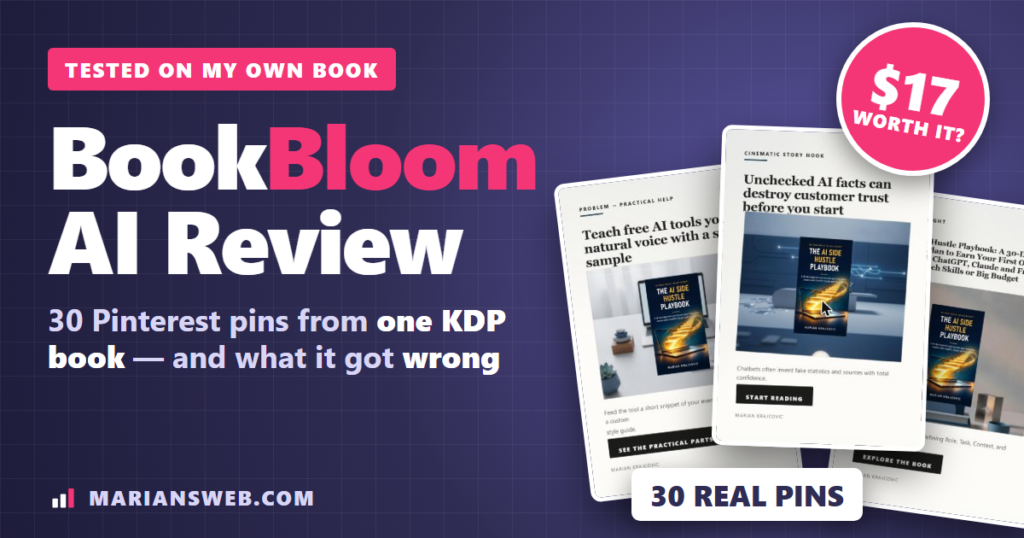
So I ran my own book through it. The AI Side Hustle Playbook went live on Amazon last week, and in this BookBloom AI review I’ll show you everything the app built for it, what it got wrong, what it really costs, and whether it’s worth $17.
BookBloom AI Review: Quick Summary
- Product: BookBloom AI (web app that builds Pinterest promotion for Amazon KDP books)
- Creator: Demetris Papadopoulos (sold on WarriorPlus)
- Price: $17 one-time at launch, $27 after the launch price ends (at the time of writing). No subscription
- Extra cost: your own AI key. Google Gemini charges about $0.039 per pin image, so 30 pins cost about $1.17 and 90 pins about $3.51
- What you get: Pinterest account blueprint (names, bio, 10 boards, keywords), a month of pins with captions and dates, a book landing page, Promotion Finder, a free channel catalog, KDP Research and the KDP AI CRACKED training
- Upgrades: offered after checkout (Pro with Video Studio and one-click publishing, Traffic, Amazon Ads builder, reader list, agency). Optional
- Guarantee: 30-day guarantee on your first campaign, if you show you really used it
- My verdict: A genuinely useful pin and content builder for KDP authors who want Pinterest traffic but hate designing pins. Check its work, and know that you still upload the pins yourself
Watch My BookBloom AI Video Review
Prefer to watch? Here’s my full BookBloom AI video review: my own book going through the wizard, the 30 pins it made, the Promotion Finder results and my verdict.
What Is BookBloom AI?
BookBloom AI is a browser-based marketing workspace for Amazon KDP authors. You give it a book (an Amazon link, plus your chapters if you want better ideas), and it builds the promotion around it: a Pinterest account plan, a month of pins with their captions and dates, a landing page for the book, and lists of places where you can promote it.
One thing to know up front: BookBloom does not post to Pinterest for you. It exports the month as a CSV file in Pinterest’s own bulk-import format. You upload that file under Import in your Pinterest settings, and Pinterest publishes the pins on the dates inside. That needs a free Pinterest business account. I actually see this as a plus: nothing goes out that you haven’t approved, and no third-party app touches your account.
How I Tested BookBloom AI
I didn’t use a demo book. I used my own nonfiction title, The AI Side Hustle Playbook (ebook and paperback, live on Amazon since November 2026), with a Google Gemini key, at one pin a day for 30 days. Every screenshot in this BookBloom AI review is from that real campaign.
Step 1: Paste Your Amazon Link
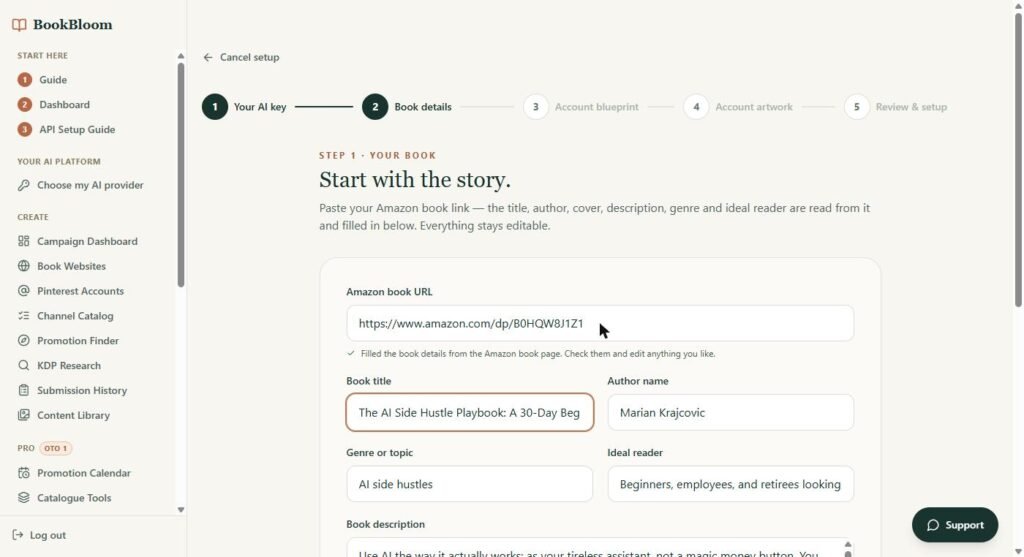
Click New campaign and a five-step wizard opens. I pasted my book’s Amazon link and, a few seconds later, the title, author, genre, ideal reader and the full description were filled in from Amazon. Then you choose a start date and how many pins per day (1 or 3, or 5 on Pro). The app shows the AI cost before you spend anything, which I liked.
Step 2: The Pinterest Account Blueprint
Next comes a plan for the Pinterest account itself: three name options, a handle, a bio under 160 characters, a profile picture brief, and ten boards in the order you should create them. Each board gets a keyword-rich description and its own keyword list. There’s also a keyword tab with broad, long-tail and problem-solving phrases (for my book: “chatgpt side hustle for beginners without tech skills”, “how to sell digital products with no money” and so on).
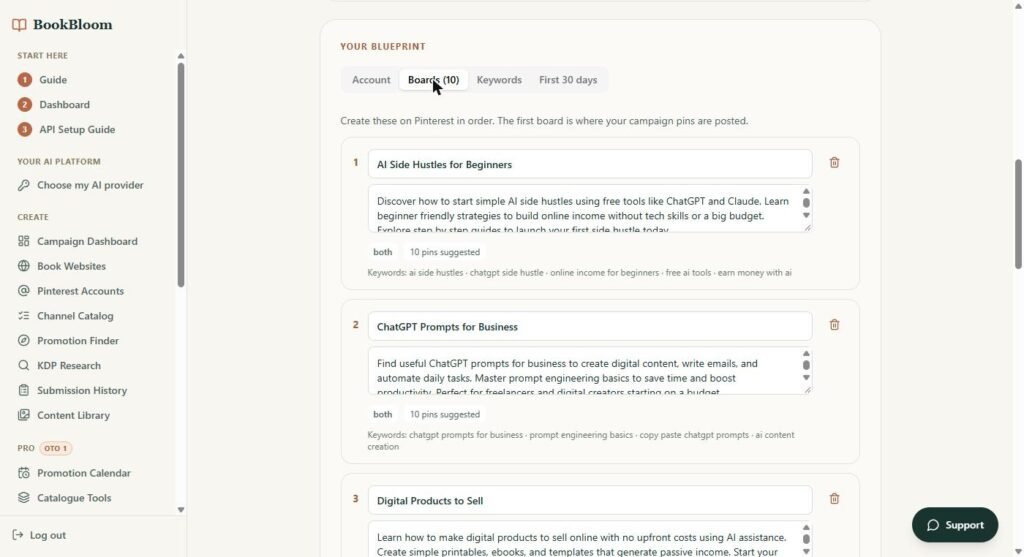
One letdown here: the First 30 days tab came back empty (“No week-by-week plan came back”), even though the sales page lists a four-week start-up plan. You can skip it and carry on, but it should have been there.
It then generates a profile picture and a banner. Both look professional, but the small line on my banner read “Earn Extra Online ncome”. AI text on images still makes typos, so check every image before you use it.
Step 3: Feed It Your Real Chapters
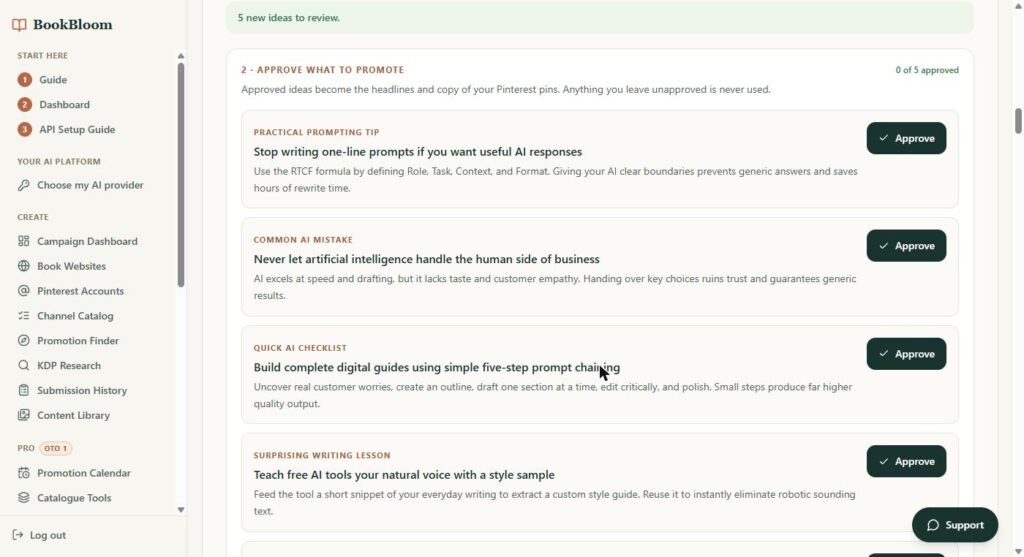
This is the part I liked most. Instead of promoting only the cover, you can upload a PDF or text of your book and choose the kind of content it holds (practical ideas, story hooks, exercises, puzzles, parent activities or prompts). I uploaded my opening chapters.
It came back with five ideas that really are in my book: the RTCF prompt formula, five-step prompt chaining, teaching AI your own writing voice, why AI shouldn’t handle the human side of a business, and checking AI facts before you publish. Not generic filler. You approve each idea, and only approved ideas end up on your pins.
Step 4: Pick Pin Styles and Generate the Month
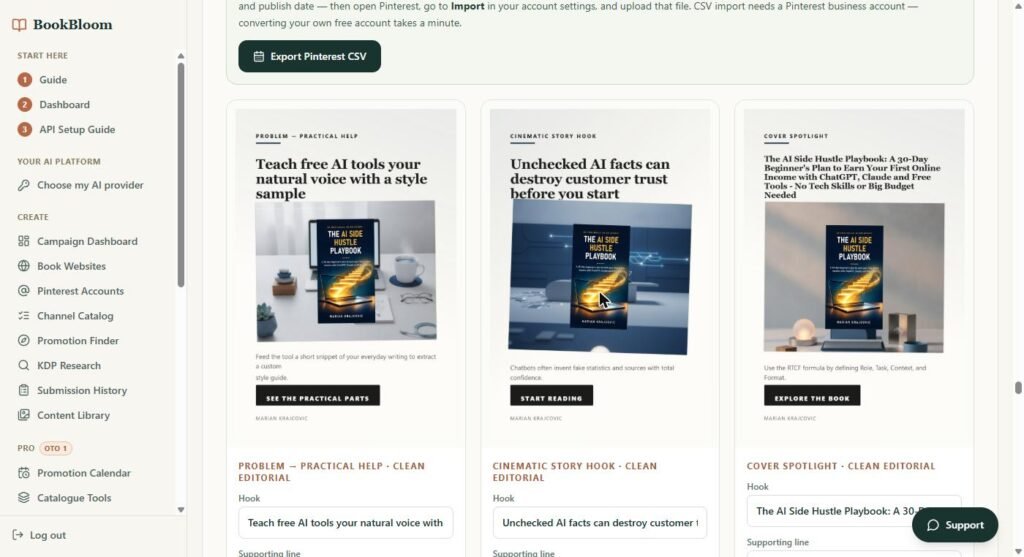
You choose three to five pin styles (Clean Editorial, Cozy Lifestyle, Cinematic and more). Every preview uses your real cover, and the cover is placed on each pin as it is: never redrawn or re-lettered by the AI. Then you click Generate and it draws one AI background per pin.
About half an hour later (it ran faster while the browser tab was in front), all 30 pins were done, at roughly $1.17 of Gemini usage. Each one carries my real cover, a different hook from the book and its own caption, spread over styles so the account doesn’t look like spam. You can change the wording on any pin and it’s redrawn from the same background without paying for another image. Read them all, though: one “reader match” pin said “For readers who love Beginners, employees, and retirees looking to earn extra online”, which is template wording I’d fix before posting.
Step 5: Export the Month to Pinterest
Every pin gets a date, a title, a description, a board and its own tracked link. Press Export Pinterest CSV, then upload the file in Pinterest under Settings > Import content. Pinterest schedules the pins on the dates in the file. Until you publish your own landing page, the links point to the book’s page on bookbloom.net.
How to Promote KDP Books on Pinterest (and Why It Works)
Pinterest works like a search engine, not a social feed. People type what they want (“puzzle book for my dad”, “clean romance 2026”, “AI side hustle for beginners”) and a pin can keep showing up in those searches for months. Relevance ranks you, not your follower count, so a brand-new account can be found on day one.
The proven pattern is simple: a steady cadence of tall 2:3 pins, keyword-rich titles and boards, different angles for the same book, and links to a page you control. That’s exactly what BookBloom automates. You can do it by hand in Canva too, it just takes a lot longer. If you want the manual method, see my guide to affiliate marketing on Pinterest, the same principles apply to books.
The Other Tools Inside: Promotion Finder, Channel Catalog, KDP Research
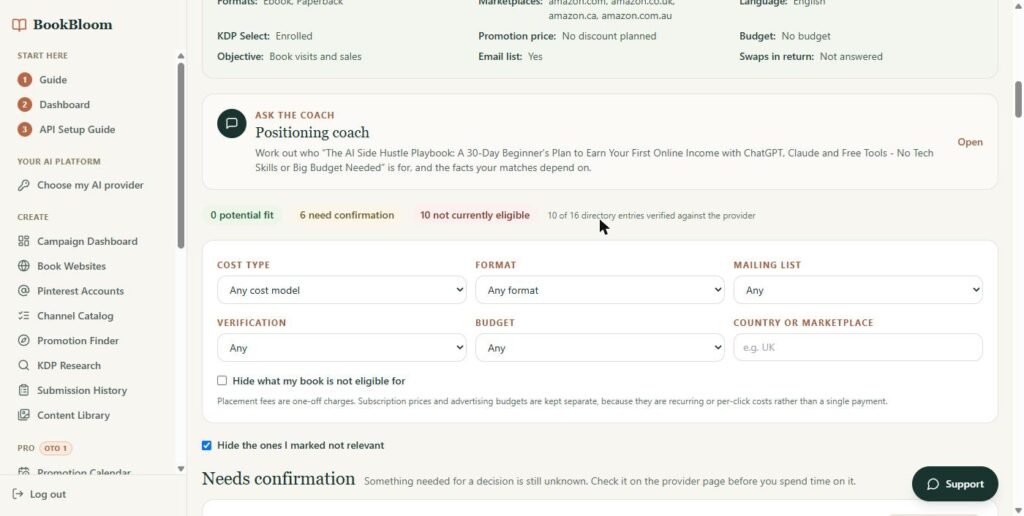
Promotion Finder checks the facts you confirm about your book (formats, price, KDP Select, budget, discount) against a directory of paid promotion programs like BookBub, Freebooksy, Bargain Booksy and Goodreads Giveaways. For my book it found 0 clear fits, 6 to confirm and 10 not eligible, out of 16 programs. That’s honest (most paid promos want a discounted price, and I had none planned), but the directory is small.
The free Channel Catalog lists 14 free places to promote a book with the rules each one states. When I tested it, none was marked as verified (11 needed a re-check), so treat it as a starting list and read each site’s rules yourself.
KDP Research searched Amazon for “AI side hustle book for beginners” and summarized what the competing listings have in common (fast timelines, “no tech skills” promises, broad prompt collections) and how a new book could stand apart. Useful before you write your next book.
What I Didn’t Like in My BookBloom AI Review Test
- The 30-day account plan came back empty in my test.
- AI text on images can have typos (my banner) and some pin wording is template-like (“For readers who love Beginners, employees, and retirees…”). You can edit any pin’s wording and it’s redrawn without another AI image, but you have to check.
- The promotion directory is small (16 programs) and the free channel list wasn’t verified when I looked.
- You pay for your own AI images. Cheap, but not zero, and Google requires billing switched on.
- No auto-posting. You do the CSV upload once a month (the sales page says about 20 minutes), and you need a Pinterest business account.
BookBloom AI Pricing (and the Real Cost)
- Front end: $17 one-time during launch, $27 after (at the time of writing). Up to 10 books at a time, and a new month of promotion every 30 days at no extra charge.
- AI usage: billed by your provider. Google Gemini about $0.039 per pin image, OpenAI about $0.053, xAI Grok about $0.020. Copy costs a fraction of a cent.
- Upgrades: offered once after checkout and not required: BookBloom Pro (Video Studio, Promotion Calendar, Catalogue Tools, one-click site publishing, 5 pins a day), Traffic, an Amazon Ads campaign builder, a reader list with email sequences, and agency tools.
- Guarantee: a 30-day guarantee on your first campaign: build it, post the first week, and if nothing moves, show the vendor you gave it a real go and you’re refunded.
BookBloom AI Alternatives
- Canva + Pinterest’s free scheduler: free or cheap, full control, but you write and design every pin yourself. That’s the slow part BookBloom removes.
- Tailwind or Later: monthly schedulers. They post for you, but they expect the pins to exist already.
- BookBub, Freebooksy and other paid promos: one newsletter send for a fee, usually only for discounted books.
- Amazon Ads: fast feedback, but $5 to $10 a day adds up quickly on a low-priced ebook.
Who Is BookBloom AI For?
Buy it if you publish on Amazon KDP (fiction, nonfiction, low content, puzzle or children’s books), want free Pinterest traffic, and hate designing pins and writing captions. It’s especially good if you have several books, because each one gets its own campaign and page.
Skip it if you want an auto-posting robot, you won’t spend 20 minutes a month on the upload, or you expect sales without consistent posting. As the founder’s own numbers show (about $625 lifetime royalties across 68 books), book marketing is a slow, long-term game.
BookBloom AI Pros and Cons
Pros
- Reads your real chapters and finds hooks that fit the book
- Keeps your real cover on every pin
- Account blueprint, 10 boards and Pinterest keywords included
- A month of dated pins plus a book landing page
- Shows the AI cost before you spend
- Nothing posts without your approval
- Low one-time price
Cons
- 30-day account plan came back empty
- Typos possible in AI image text
- Small promotion directory
- You pay for AI images (about 4 cents each)
- No auto-posting; needs a Pinterest business account
- Several upsells after checkout
BookBloom AI FAQ
Does BookBloom AI post to Pinterest for me?
No. It exports a CSV in Pinterest’s bulk-import format, you upload it once, and Pinterest schedules the pins. You need a Pinterest business account (converting a free account takes a minute).
Do I need an AI subscription?
You need an API key, not a chat subscription. A Google AI Studio key covers both copy and images, but image generation needs billing switched on in Google Cloud. ChatGPT Plus or Claude Pro plans don’t include API use.
Is BookBloom safe for my KDP account?
It never logs in to your Amazon account; it only reads your public book page and sends readers to your listing. It doesn’t include any review-swapping or paid-review tactics.
How many books can I promote?
Ten at a time on the front end, each with its own campaign and page.
Is BookBloom AI worth it?
For $17 and a dollar or two of AI images per month, yes, if you’ll actually upload the pins and keep at it. It saves hours of design and copywriting. It won’t guarantee sales, and you should check every pin before it goes out.
My BookBloom AI Review Verdict
BookBloom AI did what it promised for my book: from one Amazon link and a few chapters, it built a Pinterest account plan, 10 boards, keyword lists, a book page and a month of pins with ideas that genuinely come from the book. It has rough edges (an empty 30-day plan, an AI typo, a small promotion directory), and you still do the upload. But for authors who want free Pinterest traffic without designing every pin, it’s one of the better tools I’ve tested at this price.
Earnings disclaimer: The results and royalty figures shown on the BookBloom sales page are the vendor’s and his beta users’ own. They are not typical, and I make no income claims. Your results depend on your book, your niche and the work you put in.