


Amazon affiliate marketing on YouTube is one of the few online business models where a brand-new channel with zero subscribers can earn its first commission. People search YouTube for “best robot vacuum” or “security camera review” right before they buy, and a helpful video with your Amazon link in the description can catch that buyer for years.
Disclosure: this post contains an affiliate link to a paid training program. If you buy through it I may earn a commission at no extra cost to you. Income figures quoted below are other people’s claims, not typical results.
Some creators say they make $30,000 a month this way. That number is possible at scale, but it’s the top end. Most people who stick with it for a few months earn anywhere from nothing to a few hundred dollars a month at first. This guide shows you the full system, how to use AI so it takes hours instead of weeks, and the Amazon and YouTube rules that get beginners banned.
Why YouTube Works So Well for Amazon Affiliate Marketing
- Buyer intent. Someone typing “best budget air fryer 2026” into YouTube has already decided to buy. They just haven’t picked which one.
- Videos rank for years. A review that ranks in YouTube and Google search can keep sending clicks long after you upload it.
- No subscriber minimum. Search ranking depends on relevance, watch time and click-through rate, not channel size. You don’t need YouTube Partner Program approval to earn affiliate commissions either.
- Free traffic. You pay with time, not ad spend.
The trade-off: Amazon commissions are small per sale (often a few percent, depending on the category), so you win on volume. That’s why the product you pick matters more than anything else.
Step 1: Join Amazon Associates the Right Way
- Go to the official Amazon Associates site for your country (affiliate-program.amazon.com in the US) and click Sign up.
- When it asks for your website, add your YouTube channel URL. Create the channel first (Step 2) so you have something to list.
- Describe your channel honestly: product reviews and comparisons in your niche.
Know the 180-day rule. New accounts must make three qualifying sales within 180 days or Amazon closes the application. You can reapply, but it’s better to publish several videos before you sign up so the clock doesn’t run out while your channel is empty.
Step 2: Set Up a Focused YouTube Channel
Create a channel from your Google account, then pick one niche you can make 30+ videos about: home security, kitchen gadgets, home office gear, pet products, camping gear. A focused channel (“Smart Home Picks”) ranks and converts far better than a channel that reviews random things.
Fill out the About section, add a simple banner, and put this line in your channel description, because Amazon requires it: “As an Amazon Associate I earn from qualifying purchases.”
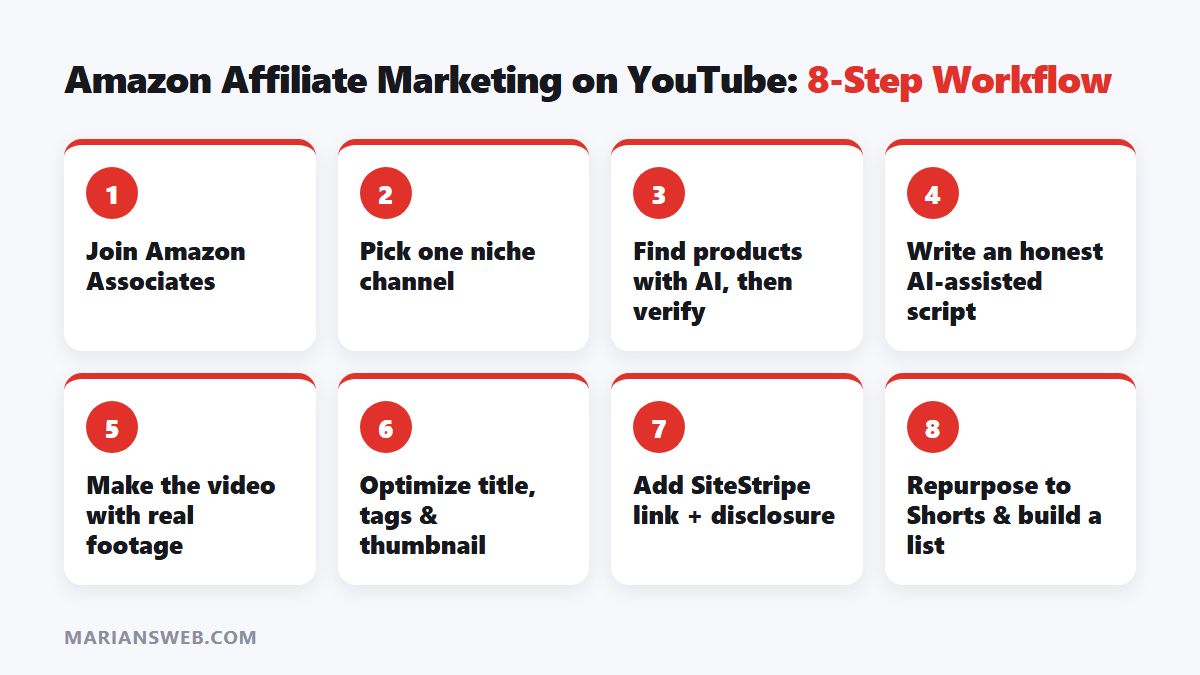
Step 3: Use AI to Find Amazon Affiliate Products (Then Verify the Data)
AI chat tools are great for brainstorming product ideas and angles. Paste a prompt like this into ChatGPT, Claude or Gemini:
I run a YouTube channel reviewing [niche] products for Amazon buyers. List 15 product types people actively search for reviews of, with typical price ranges. For each, suggest 3 video angles: a “best X under $Y” list, a comparison, and a beginner buying guide.
Then verify everything yourself, because AI tools often invent sales numbers and commission rates:
- Check the product’s Amazon page for review count, rating and Best Sellers Rank.
- Type the product into YouTube search and look at the autocomplete suggestions. Those are real searches.
- Look up the category in Amazon’s current commission rate table inside your Associates dashboard.
- Prefer products in the $50 to $300 range. They earn more per sale than cheap items, and buyers still decide quickly.
If you’re new to writing prompts, my guide on how to write AI prompts that get great results shows how to get specific answers instead of generic filler.
Step 4: Turn Research Into a Script With AI
Don’t just paste the Amazon description and read it back. Viewers (and YouTube) can tell. Give the AI real material: the product’s features, the common complaints from 3-star reviews, and how it compares to one or two alternatives. Then ask for structure:
Write a 5-minute YouTube script reviewing [product] for [audience]. Use this research: [paste notes]. Structure: a hook in the first 10 seconds, who it’s for, 3 strengths, 2 honest weaknesses, how it compares to [alternative], and a clear verdict. Suggest a title under 60 characters that includes “[main keyword]”, plus 10 tags.
Edit the script so it sounds like you. Honest weaknesses build trust, and trust is what makes people click your link instead of someone else’s.
Step 5: Make Faceless Videos With AI Tools
| Job | Tools people use |
|---|---|
| Script to video with stock footage | Pictory, InVideo, Lumen5 |
| Natural voiceover | ElevenLabs, Murf |
| Thumbnails | Canva |
| Captions | YouTube auto-captions (then correct them) |
Read my walkthrough of how Pictory turns scripts into videos if you want to see how that part works.
An important warning: videos made only of generic stock clips and a robot voice tend to perform poorly, and YouTube’s monetization rules penalize “inauthentic” mass-produced content. Mix in real product footage: unboxing clips, screen recordings of the product page, close-ups of the item if you own it, or official product videos where the brand allows it. The more original your video is, the better it ranks.
Step 6: Optimize Each Video for Search
- Title: put the exact search phrase first, e.g. “Best Home Security Camera Under $100 (2026)”.
- Description: two sentences summarizing the video, then your affiliate link and disclosure in the first lines, then timestamps.
- Thumbnail: the product, 3 to 5 bold words, high contrast.
- Playlists: group related reviews (“Home Security 2026”) to raise session watch time.
- End screens and cards: point viewers to your next related review.
Step 7: Add Amazon Affiliate Links Without Breaking the Rules
- In Amazon, open the product page while logged into Associates and use the SiteStripe bar to grab your link. Its amzn.to short link is fine to use.
- Don’t run Amazon links through third-party shorteners or cloakers. Amazon’s rules don’t allow hiding that a link goes to Amazon.
- Don’t quote exact prices in your video. They change, and Amazon restricts showing prices that aren’t live.
- Use a separate tracking ID for each channel or platform so you can see what’s working.
Step 8: Scale With Shorts and Other Platforms
Once a long video gets views, cut its best 30 to 60 seconds into a YouTube Short that points people to the full review. You can reuse the same clips on Pinterest, TikTok and Instagram Reels (check each platform’s link rules). Answering buyer questions on Quora and Reddit with a link to the full review also works when you follow community rules. These guides go deeper:
- How to make money with YouTube Shorts
- Turning one short-form video into a traffic engine
- Pinterest affiliate marketing with AI
- Quora affiliate marketing using AI
Consistency beats perfection: two or three useful videos a week for three months will teach you more than any course.
Build an Email List Alongside Your Channel
YouTube can change its algorithm and Amazon can change its commission rates (it has cut them before). An email list is the one audience you own. Even a simple “free buyer’s checklist” link in your video descriptions can turn viewers into subscribers you can email about future reviews and deals.
I wrote a free step-by-step guide for exactly this: The $0 Funnel: Build Your First Email List Without Spending a Dime.
Want a Done-for-You Video Course?
If you’d rather follow a video course for the faceless-video and AI-prompt side, the AI Marketers Club covers faceless video creation, prompt workflows and multi-platform traffic. It’s a paid program and results aren’t guaranteed, so treat it as optional. Everything in this post works without it.
See what’s inside the AI Marketers Club →
Amazon Affiliate Marketing on YouTube: FAQ
Do I need to show my face?
No. Many successful review channels use voiceover and product footage only. Original footage and an honest opinion matter more than your face.
Is Amazon Associates free?
Yes. It’s free to join, but you need three qualifying sales within 180 days to stay approved.
Do I need 1,000 subscribers first?
No. Affiliate links in your video description work from your first video. The YouTube Partner Program threshold only matters for ad revenue.
How long until I earn?
It varies a lot. Some videos get a sale in the first week, but most channels need two to four months of steady uploads before income becomes consistent.
Can I do this if English isn’t my first language?
Yes. AI voice tools handle many languages, and you can also target your local Amazon store in your own language, where competition is often lower.
Start Your Amazon Affiliate Marketing Channel Today
Amazon affiliate marketing rewards people who keep publishing helpful reviews. Pick your niche today, publish three helpful videos before you apply to Amazon Associates, and build your email list from day one. If you get stuck, leave a question in the comments and I’ll answer it.
Earnings disclaimer: any income examples are not typical. Your results depend on your niche, effort, skills and market conditions.



Really thoughtful breakdown in your latest article. One recurring friction point when repurposing international creator clips is dealing with stylized, hardcoded subtitles that clash with vertical aspect ratios. In past workflows, simple crop masks or Gaussian blurs inevitably left smudged pixels across active frames. Testing a dedicated inpainting pipeline through remove captions from video made a huge difference—it reconstructs the background texture beneath burned-in captions cleanly while preserving native video resolution. When localizing clips with complex burned-in text, do you usually prioritize mask feathering or multi-frame temporal consistency first?
Pingback: Short-Form Video for Affiliate Income: 7-Step System