

Pinterest affiliate marketing with AI is one of the most beginner-friendly ways to earn commissions from free traffic. Pinterest works like a visual search engine: people type in what they’re looking for, and a well-optimized pin can keep sending clicks for months, sometimes years. AI makes creating those pins fast.
Disclosure: this post contains affiliate links, including to Fiverr. If you buy through them I may earn a commission at no extra cost to you. Income figures from other creators are their claims, not typical results.
In this guide I’ll use the Fiverr affiliate program as the example offer, because freelance services fit Pinterest searches like “logo ideas” or “social media templates” really well. The same steps work for almost any affiliate program.
Why Pinterest Is Great for Affiliates
- Search intent: people come to plan and buy, not just to scroll.
- Long shelf life: pins get found through search for months, unlike posts that vanish in a day.
- No face required: it’s all images, titles and descriptions.
- Outbound clicks are normal: every pin can link to a website.
Step 1: Pick an Affiliate Program That Matches Pinterest Searches
Fiverr works well because its services match things people pin: logos, branding, wedding invitations, social media graphics, Etsy shop setup. Join through the official Fiverr Affiliates page and list Pinterest as your traffic source. My complete Fiverr affiliate program guide explains commissions, tracking and which services to choose.
Other good fits: Amazon Associates for home and gift ideas, software tools with recurring commissions, and your own digital products.
Step 2: Set Up a Pinterest Business Account
- Create a free business account (or convert your personal one).
- Write a keyword-rich profile name and bio, e.g. “Branding & Logo Ideas for Small Business”.
- Claim your website so your pins get attribution and you can see analytics.
- Create 5 to 10 boards with keyword-based names like “Minimalist Logo Ideas” and “Instagram Post Templates”.
Step 3: Do Keyword Research Inside Pinterest
Type a broad term into the Pinterest search bar and write down the suggestions it shows. Those are real searches. Then check Pinterest Trends to see which topics are growing and when they peak (wedding topics peak in winter and spring, for example). Plan seasonal pins 6 to 8 weeks before each peak.
Build a list of 20 to 30 keyword phrases, and match each to a Fiverr category and a landing page.
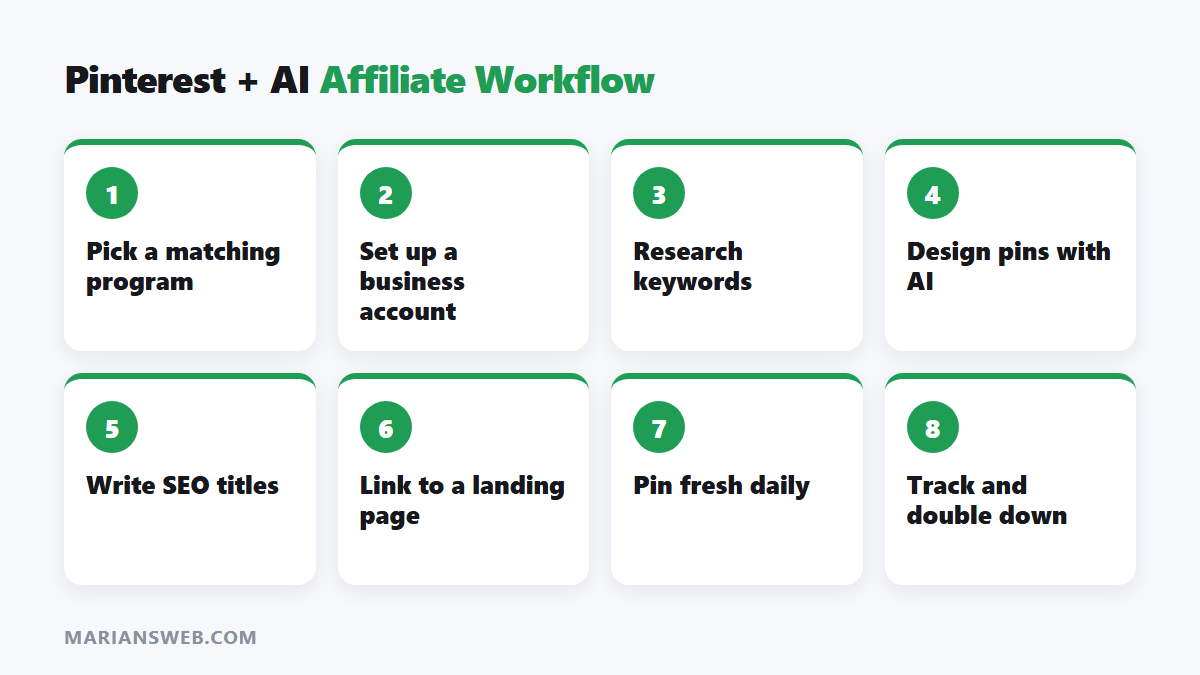
Step 4: Create Pin Designs With AI
Pins that get clicks usually have a clear text overlay (“15 Logo Ideas for Bakeries”), a vertical 2:3 format (1000 × 1500 px) and a clean, readable design. A fast workflow:
- Ask ChatGPT or Claude for 10 pin headline ideas for one keyword.
- Generate background images with an AI image tool, or use Canva templates.
- Add the headline in Canva with big, readable text.
- Make 3 to 5 different designs for each landing page. Fresh pins (new images) get more distribution than re-pinning the same image.
Don’t use AI images that misrepresent what someone will get, for example a fake “finished logo” that no seller made. Show inspiration and examples honestly.
Step 5: Write SEO Titles and Descriptions With AI
Write 5 Pinterest pin titles (max 100 characters) and a 2 to 3 sentence description for a pin targeting the keyword “[keyword]”. It links to a guide about [topic]. Include the keyword naturally and 2 related phrases. No hashtag stuffing.
Pinterest reads your title, description, board name and even the text in your image to decide what your pin is about, so keep them consistent.
Step 6: Send Clicks to a Landing Page
Pinterest allows affiliate links, but new accounts that link straight to affiliate URLs often get flagged as spam. A simple landing page or blog post is safer and converts better. For example, “20 Bakery Logo Ideas + Where to Get One Designed” can show examples, explain prices and link to recommended Fiverr sellers. Always include an affiliate disclosure on that page.
Add an email opt-in to the page too. Pinterest visitors who join your list can buy from you again and again. My free guide The $0 Funnel shows how to set this up for free.
Step 7: Publish Consistently and Track Results
- Publish 3 to 10 fresh pins a day, spread across your boards.
- Give pins time. Pinterest traffic often takes 2 to 3 months to build.
- Check Pinterest Analytics monthly: double down on pins with high outbound clicks and make more variations of them.
- Track affiliate clicks with a separate Fiverr sub-ID for Pinterest.
Want more Pinterest strategies? See how to make money with Pinterest affiliate marketing.
Pinterest Affiliate Marketing With AI: FAQ
Can I use AI images on Pinterest?
Yes. Pinterest may label AI-generated or AI-modified images. Make sure they’re relevant and not misleading.
How many followers do I need?
None. Pinterest distributes pins through search and the home feed, so followers matter far less than keywords and fresh pins.
How long before I get sales?
Expect a few months of consistent pinning before traffic and commissions build. Seasonal topics can move faster if you pin 6 to 8 weeks before the peak.
Is Pinterest worth it in 2026?
Yes, for topics people plan and shop for. It’s less useful for news or very technical topics.
Start Pinning
Choose one Fiverr category, research 20 keywords, build one landing page and create your first 15 pins this week. Browse top-rated Fiverr services here to pick sellers worth recommending.
Earnings disclaimer: results vary and depend on your niche, effort and the affiliate program’s current terms. No income is guaranteed.