



Want to make money with Pinterest affiliate marketing as a complete beginner? Pinterest is one of the friendliest platforms to start on: people use it like a search engine to plan purchases, pins keep getting found for months, and you don’t need followers or a face on camera. This beginner guide covers choosing programs, setting up your account, creating pins and avoiding the mistakes that get new accounts flagged.
Disclosure: this post contains affiliate links. If you buy through them I may earn a commission.
Why Pinterest Works for Affiliates
- Search behaviour: users search for ideas they want to act on, like recipes, decor, gifts and tools.
- Long-lasting traffic: pins can bring clicks for months or years.
- Beginner-friendly: no followers needed to get impressions.
- Visual format: a good image and title do most of the selling.
Step 1: Choose Affiliate Programs That Fit Pinterest
| Niche | Program ideas |
|---|---|
| Home, kitchen, gifts | Amazon Associates, Etsy via Awin |
| Small business and design | Fiverr (logos, branding, social media help) |
| Digital products and courses | ClickBank, WarriorPlus, creator programs |
| Software and tools | Recurring SaaS programs |
More options in affiliate programs that pay.
Step 2: Set Up a Pinterest Business Account
- Create a free business account on Pinterest.
- Use a keyword-rich display name and bio.
- Claim your website if you have one.
- Create 5 to 10 boards named after real searches (“Small Kitchen Organization Ideas”).
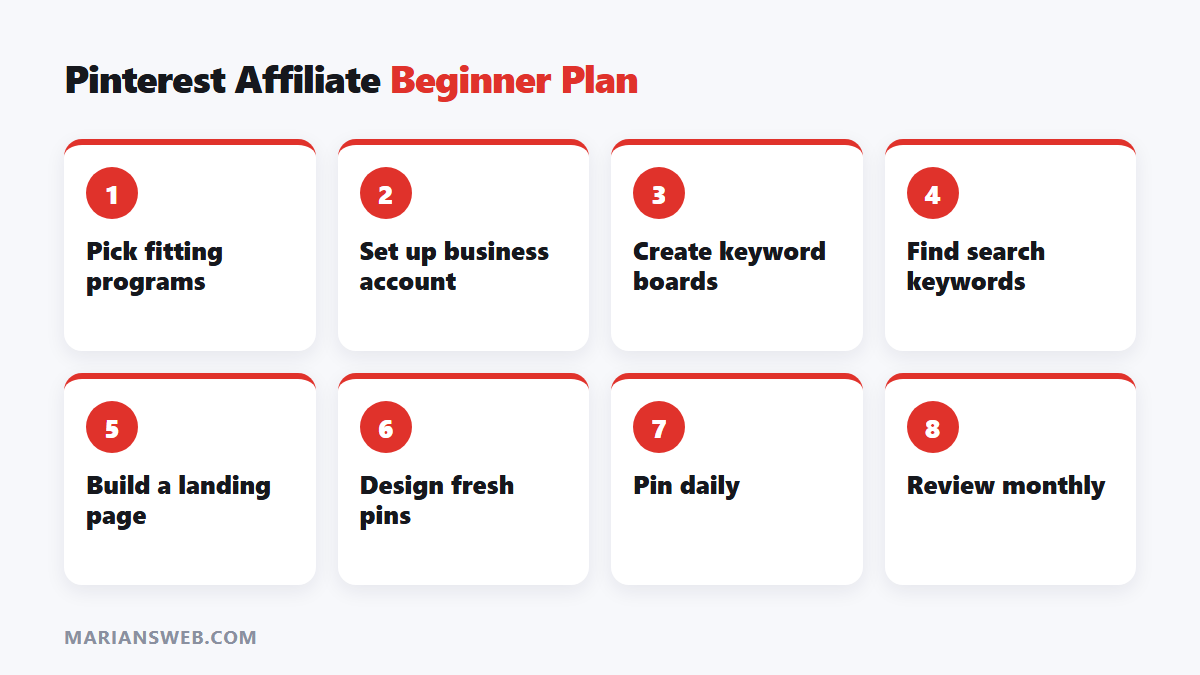
Step 3: Find Keywords
Type broad topics into Pinterest search and note the suggestions. Check Pinterest Trends for seasonal peaks. Each keyword becomes a pin topic and, ideally, a landing page or blog post.
Step 4: Create Your Affiliate Links and Landing Pages
Create tracked links in each program’s dashboard. For best results, link pins to a helpful page (a blog post or simple landing page) that recommends products, rather than straight to an affiliate link. It converts better and protects your account. Always disclose affiliate links.
Step 5: Design Pins That Get Clicks
- Vertical 2:3 images (1000 × 1500 px)
- Clear text overlay with the benefit (“15 Small Kitchen Hacks”)
- Bright, readable design (Canva templates work well)
- Several fresh designs per link
AI can speed this up a lot: see Pinterest affiliate marketing with AI.
Step 6: Publish Consistently
- Publish a few fresh pins every day.
- Write keyword-rich titles and descriptions.
- Pin seasonal content 6 to 8 weeks before the season.
- Review analytics monthly and make more of what gets outbound clicks.
Common Beginner Mistakes
- Pinning only raw affiliate links from a brand-new account
- Using the same image over and over
- Choosing topics nobody searches for
- Expecting results in the first few weeks
- Forgetting disclosures
Build a List From Your Pinterest Traffic
Pinterest visitors who join your email list can buy again and again. Offer a free checklist or guide on your landing page. My free guide The $0 Funnel shows how.
Pinterest Affiliate Marketing: FAQ
Do I need a blog?
Not strictly, but a blog or landing page improves results and account safety.
How long until I earn?
Usually a few months of consistent pinning.
Is Pinterest still worth it?
Yes, especially for home, food, style, gifts, DIY and planning topics.



Pingback: Pinterest Affiliate Marketing + AI: Step-by-Step Guide
Pingback: TRK Weight Loss Premium Package Review