

Safelists are one of the oldest free traffic sources in online marketing, and they still work if you use them the right way. A safelist is an email community where members agree to receive promotional emails from each other in exchange for being allowed to send their own. Because everyone opted in, you can promote without spam complaints. The catch: everyone on a safelist is also a marketer, so the usual tactics don’t work.
Disclosure: some links in this post go to my own pages or are affiliate links.
How Safelists Work
- Join: most safelists have a free level and paid upgrades.
- Earn credits: you earn credits by opening and clicking other members’ emails (often by viewing a page for a few seconds).
- Send: you spend credits to email your message to some or all members.
- Upgrade: paid members can usually send more often to more people.
What Safelists Are Good For (and What They’re Not)
| Good for | Not good for |
|---|---|
| Building your own email list with a free offer | Selling expensive products directly |
| Promoting free tools, traffic exchanges and low-cost offers | Non-marketing niches (fitness, pets, crafts) |
| Testing headlines and landing pages cheaply | Replacing a real audience |
| Getting referrals in list-building programs | Fast, large income on their own |
Step 1: Choose Good Safelists
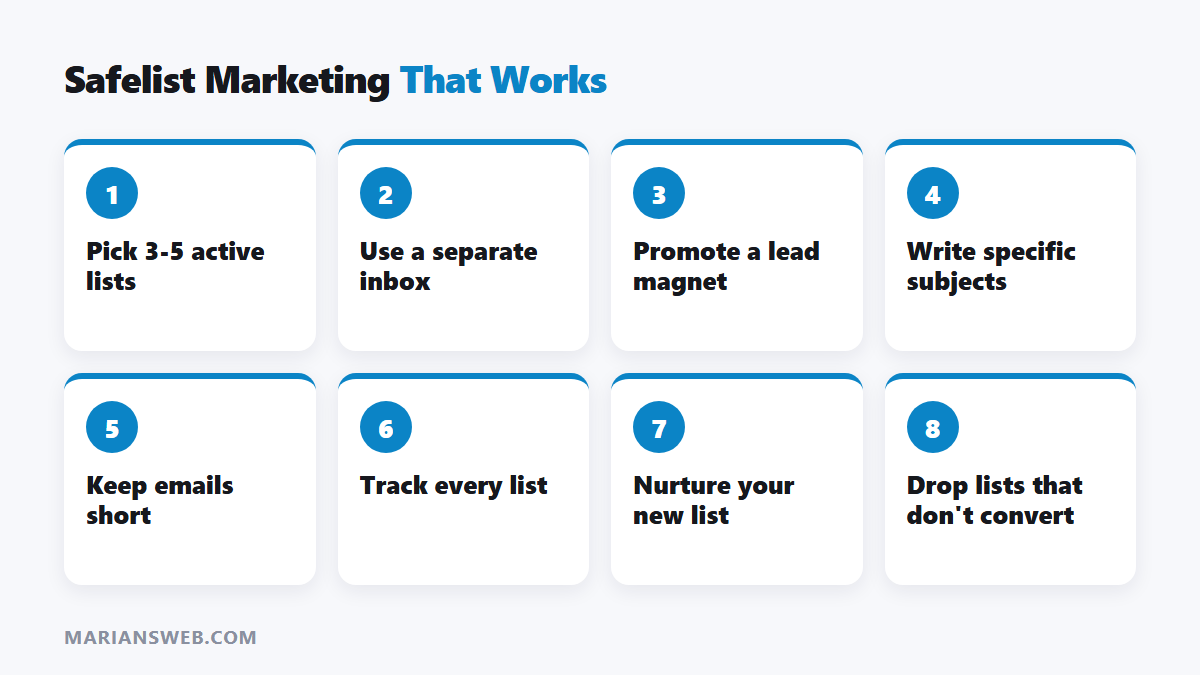
- Pick lists that are actively maintained, with recent activity and responsive support.
- Prefer lists that remove inactive members, since a smaller active list beats a big dead one.
- Start with 3 to 5 lists rather than joining dozens.
- Use a separate email address just for safelists.
Step 2: Promote a Lead Magnet, Not a Sales Page
Safelist members are busy marketers skimming for a few seconds. They rarely buy from a cold sales page, but they will grab a useful free resource. Send them to a squeeze page with a free guide, then follow up by email. That turns short attention into a long relationship. My free guide The $0 Funnel shows how to build the page and follow-up sequence for free.
Step 3: Write Subject Lines That Stand Out
- Be specific: “Free 20-page guide: your first email list for $0” beats “AMAZING opportunity!!!”
- Ask a relevant question: “Still paying for your autoresponder?”
- Avoid all caps, excessive punctuation and hype; members ignore it.
- Test 3 to 5 subject lines and keep the winners.
Step 4: Keep the Email Short
Three to five short lines: the problem, the free solution and the link. Members open many emails to earn credits, so a quick, clear message gets the click.
Step 5: Track Everything
Use a tracking link for each safelist so you can see clicks and opt-ins by source. Drop lists that don’t produce subscribers after a few weeks. Tracking also shows which subject lines and pages work best. I use LeadsLeap for link tracking.
Step 6: Build Your List, Then Nurture It
The real value of safelist traffic is the subscribers you keep. Send a welcome email immediately, share helpful tips regularly, and recommend products only when they fit. Over time those subscribers become far more valuable than any single safelist mailing.
Step 7: Combine Safelists With Other Free Traffic
Safelists work well alongside traffic exchanges, co-ops and content marketing. See LeadsLeap Traffic Coop, Traffic Ad Bar and 8 free traffic tactics for more sources.
Common Safelist Mistakes
- Sending people straight to a sales page
- Joining too many lists and burning out on credit clicking
- Not tracking results
- Expecting buyers in non-marketing niches
- Paying for upgrades before knowing which lists convert
Safelists: FAQ
Are safelists spam?
No. Every member agreed to receive mailings from other members. Sending the same emails to people who didn’t opt in would be spam.
Do safelists still work?
Yes, for list-building and promoting marketing-related offers. They’re a supplement, not a full traffic strategy.
Should I pay for an upgrade?
Only after free accounts show a list produces opt-ins for you.
Learn More
Want step-by-step training? Get my free safelist marketing training here.