


A password manager is one of the simplest, most effective ways to protect your online life, and essential if you run an online business with dozens of logins for email, payment processors, affiliate networks and hosting. It creates strong, unique passwords for every account, remembers them for you and fills them in automatically. I recommend RoboForm, and here’s why every marketer should use a password manager.
Disclosure: this post contains affiliate links. If you buy through them I may earn a commission.
Why Reused Passwords Are Dangerous
When one website is breached, attackers try the leaked email and password on other sites (“credential stuffing”). If you reuse passwords, one breach can unlock your email, PayPal, affiliate accounts and website. For an online business, that can mean stolen commissions, hijacked accounts and lost income. See what happened to my PayPal account for why account security matters.
What a Password Manager Does
Creates unbreakable passwords
Generates long, random passwords with letters, numbers and symbols, a unique one for every site.
Remembers them for you
Stores everything in an encrypted vault. You remember one strong master password.
Fills logins automatically
Saves time and protects against phishing, since autofill won’t trigger on a fake look-alike site.
Shares passwords securely
Give a virtual assistant or team member access to an account without sending passwords by email or chat.
Emergency access
Designate a trusted contact who can access your vault if something happens to you, important for business continuity.
Stores more than passwords
Securely save identities, addresses, card details and notes for faster form filling.
Security audits and breach alerts
Get warned about weak, reused or compromised passwords so you can fix them quickly.
Setting Up a Password Manager
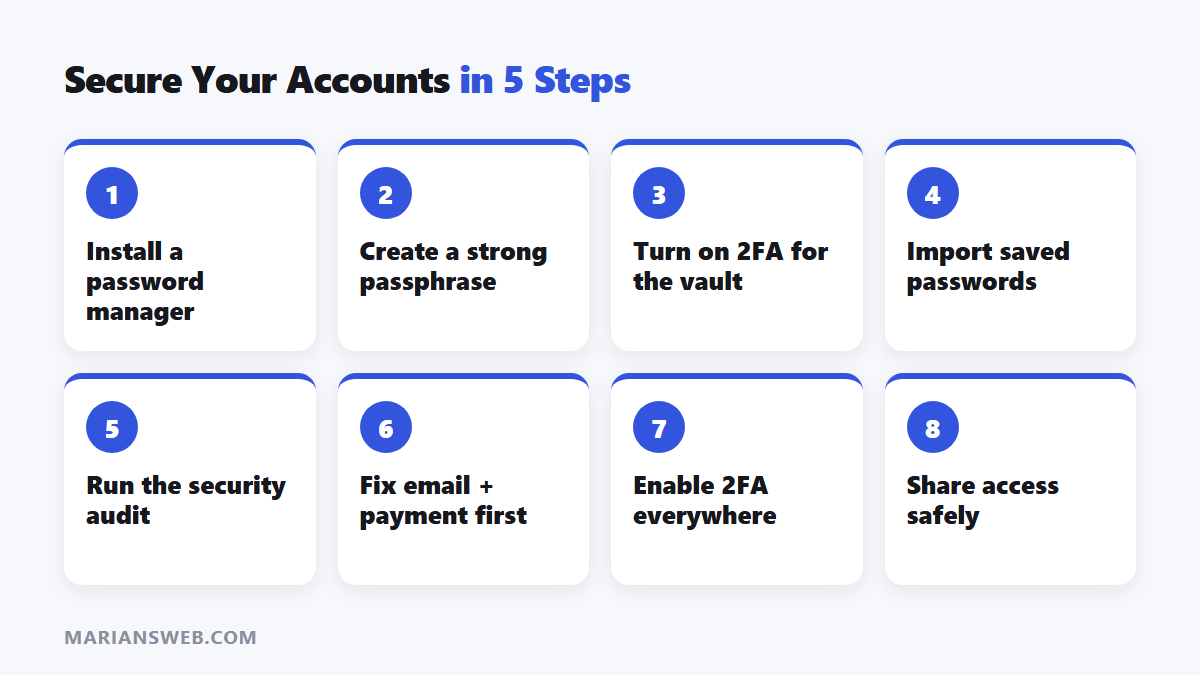
- Choose a reputable password manager and install the browser extension and app.
- Create a long, memorable master password (a passphrase of several random words works well).
- Turn on two-factor authentication for the vault.
- Import saved passwords from your browser.
- Run the security audit and update weak or reused passwords, starting with email and payment accounts.
Extra Security Habits for Online Marketers
- Turn on two-factor authentication for email, payment, hosting and affiliate accounts.
- Never click “account suspended” login links in emails; open the site directly.
- Use separate email addresses for safelists and public sign-ups.
- Keep WordPress, plugins and themes updated; see building a website or blog.
Password Manager: FAQ
Is it safe to store all passwords in one place?
Reputable managers encrypt your vault so that only you can unlock it. It’s far safer than reused or written-down passwords.
What if I forget my master password?
Set up the recovery options your manager offers when you create the account.
Does it work on my phone?
Most password managers sync across computers, phones and tablets.