

This Ecover Authority review looks at a tool for creating professional 3D ebook covers, software boxes and product mockups without Photoshop or a designer. Even digital products need a cover: people judge a product by how it looks, and a good mockup raises perceived value on sales pages, social posts and marketplaces. Here’s what Ecover Authority does and whether it’s worth it.
Disclosure: this review contains affiliate links. If you buy through them I may earn a commission at no extra cost to you.
Why Digital Products Need Covers
- First impressions: a polished cover signals a quality product.
- Branding: consistent covers make your products recognisable.
- Perceived value: a 3D box or book mockup makes a PDF feel tangible.
- Marketing: covers are what people share on social media and in emails.
The problem: Photoshop has a steep learning curve, and hiring a designer for every product adds up quickly.
What Ecover Authority Does
- Creates 3D ebook covers, boxes, bundles and device mockups
- Template-based designs you customise with your own text and images
- Browser-based, with no design software needed
- Exports images ready for sales pages and marketplaces
Example Covers


How to Create a Cover
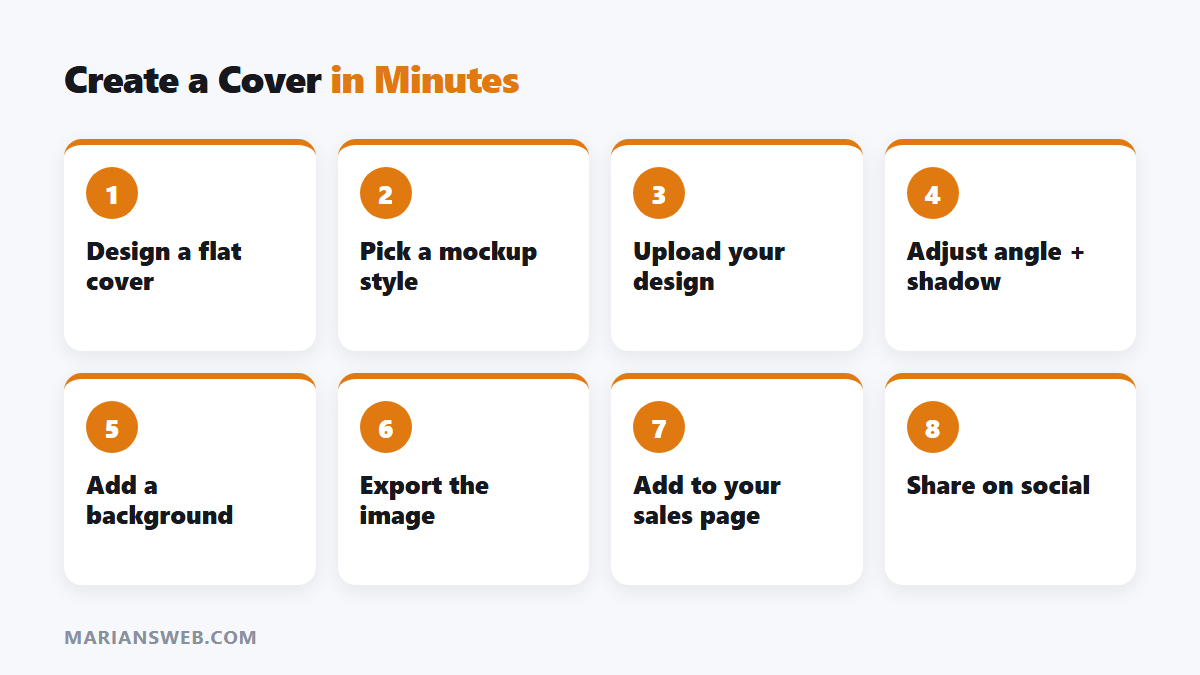
- Choose a template or mockup style.
- Upload your flat cover design or build one with the editor.
- Adjust angles, shadows and backgrounds.
- Export and use it on your sales page, product listing or social posts.
Need a flat design first? Canva works well; then use Ecover Authority to turn it into a 3D mockup.
Who It’s For
- Product creators selling on WarriorPlus, JVZoo or Gumroad; see how to sell on WarriorPlus
- PLR sellers rebranding products; see the best PLR niches
- Marketers creating lead magnets and bonuses
- Freelancers offering cover design services
Pros
- Professional mockups without design skills
- Saves the cost of a designer for every product
- Fast enough to create covers for bonuses and lead magnets
Cons
- Template-based, so less unique than a custom design
- You still need a good flat cover design or text
- Check the pricing model and any upgrades before buying
Ecover Authority Review: FAQ
Do I need design experience?
No. It’s built for non-designers.
Can I use covers commercially?
Check the licence for your plan, especially for client work.
Are there free alternatives?
Canva has some mockup features, but dedicated 3D mockup tools usually look more professional.
Building your first product? See the 48-hour digital product blueprint and start your list with my free guide The $0 Funnel.